| Product Recognition | |
|---|
| Certification Number | ZC14-26010569 |
|---|
| Name | Water Sensor 8 |
|---|
| Short Description | Aeotec Water Sensor 8 |
|---|
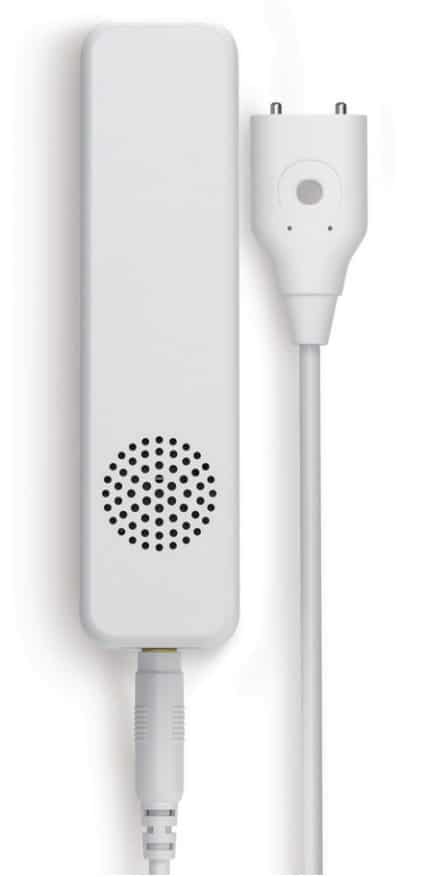
| Description | Aeotec Water Sensor 8 is a sensor, which detects dry contact, measures temperature and humidity. The sensor is easily retrofittable. Thanks to its slim design, Aeotec Water Sensor 8 can be installed in any bathroom, behind a kitchen sink or in any other tight space. The sensor just has to be installed on the wall and the sensor probe must be put on the floor.By using the internal temperature and humidity sensor, the device will report on any significant change. Twice clicking the action button includes (adds) and excludes (removes) the device. A single click on the button will wake up the device.
This product supports Security 2 Command Class. While a Security S2 enabled Controller is needed in order to fully use the security feature. This product can be operated in any Z-Wave® network with other Z-Wave/ Z-Wave Plus® certified devices from other manufacturers. All mains operated nodes within the network will act as repeaters regardless of vendor to increase reliability of the network. This device also supports SmartStart. |
|---|
| Brand | Aeotec |
|---|
| Brand Owner | Aeotec Limited |
|---|
| Identifier | ZWA056-C |
|---|
| Product Line | Z-Wave Plus v2 line |
|---|
| Product URL | www.aeotec.com |
|---|
| OEM Version | HW: 56 FW: 01.00 |
|---|
| Hardware Platform | EFR32ZG23A |
|---|
| Z-Wave Version | 7.23.2 |
|---|
| Library Type | END_NODE_ENHANCED_232 |
|---|
| Device Type | Notification Sensor DT |
|---|
| Role Type | ROLE_TYPE_END_NODE_ALWAYS_ON, ROLE_TYPE_END_NODE_SLEEPING_REPORTING |
|---|
| Manufacturer ID | 0x0371 |
|---|
| Product Type ID | 0x0002 |
|---|
| Product ID | 0x0038 |
|---|
| User Icon | 0x0C05 |
|---|
| Installer Icon | 0x0C05 |
|---|
| Radio Range Z-Wave (m) | 40 |
|---|
| Radio Range Z-Wave LR (m) | 400 |
|---|
| Frequency Plans | EU: 869.85MHz, 868.40MHz, EU_LR: 864.00MHz, 866.00MHz |
|---|
| Categories | Sensors |
|---|
| Countries / Regions | Armenia, Bahrain, European Union, Cyprus, Moldova, Egypt, French Guiana, Georgia, Iraq, Jordan, Kazakhstan, Kuwait, Lebanon, Libya, Maldives, Mauritius, Nigeria, Oman, Philippines, Qatar, Saudi Arabia, South Africa, Turkmenistan, United Arab Emirates, ZU, Yemen |
|---|
| Supported Command Classes | | Identifier | Name | Key | Version |
|---|
| COMMAND_CLASS_SENSOR_BINARY_V2 | Binary Sensor V2 | 0x30 | 2 | | COMMAND_CLASS_CONFIGURATION_V4 | Configuration V4 | 0x70 | 4 | | COMMAND_CLASS_SENSOR_MULTILEVEL_V11 | Multilevel Sensor V11 | 0x31 | 11 | | COMMAND_CLASS_NOTIFICATION_V8 | Notification V8 | 0x71 | 8 | | COMMAND_CLASS_ASSOCIATION_V2 | Association V2 | 0x85 | 2 | | COMMAND_CLASS_ASSOCIATION_GRP_INFO_V3 | Association Group Information (AGI) V3 | 0x59 | 3 | | COMMAND_CLASS_BATTERY | Battery | 0x80 | 1 | | COMMAND_CLASS_DEVICE_RESET_LOCALLY | Device Reset Locally | 0x5A | 1 | | COMMAND_CLASS_FIRMWARE_UPDATE_MD_V5 | Firmware Update Meta Data V5 | 0x7A | 5 | | COMMAND_CLASS_INDICATOR_V3 | Indicator V3 | 0x87 | 3 | | COMMAND_CLASS_MANUFACTURER_SPECIFIC_V2 | Manufacturer Specific V2 | 0x72 | 2 | | COMMAND_CLASS_MULTI_CHANNEL_ASSOCIATION_V3 | Multi Channel Association V3 | 0x8E | 3 | | COMMAND_CLASS_VERSION_V3 | Version V3 | 0x86 | 3 | | COMMAND_CLASS_WAKE_UP_V2 | Wake Up V2 | 0x84 | 2 | | COMMAND_CLASS_ZWAVEPLUS_INFO_V2 | Z-Wave Plus Info V2 | 0x5E | 2 | | COMMAND_CLASS_SECURITY_2 | Security 2 | 0x9F | 1 | | COMMAND_CLASS_SUPERVISION | Supervision | 0x6C | 1 | | COMMAND_CLASS_TRANSPORT_SERVICE_V2 | Transport Service V2 | 0x55 | 2 | | COMMAND_CLASS_POWERLEVEL | Powerlevel | 0x73 | 1 |
|
|---|
| S2 Classes | S2_AUTHENTICATED, S2_UNAUTHENTICATED |
|---|
| Documents | |
|---|
| Features | | Feature | Values |
|---|
| Battery Quantity | | | Battery Type | | | Color | | | Firmware Updatable | | Value |
|---|
| Updatable by Consumer by RF |
|
|
|---|
| Association Groups | | Group Number | Maximum Nodes Supported | End Point ID | Group Name | Profile |
|---|
| 1 | 5 | 0 | Lifeline | 0x0001 | | 2 | 5 | 0 | Control | 0x7105 | | 3 | 5 | 0 | Alarm | 0x7105 | | 4 | 5 | 0 | Tamper | 0x7107 | | 5 | 5 | 0 | Temperature High Trigger | 0x7104 | | 6 | 5 | 0 | Temperature Low Trigger | 0x7104 | | 7 | 5 | 0 | Humidity High Trigger | 0x7110 | | 8 | 5 | 0 | Humidity Low Trigger | 0x7110 | | 9 | 5 | 0 | Mold danger | 0x7110 | | 10 | 5 | 0 | Air Temperature | 0x7104 |
|
|---|
| Configuration Parameters | | Parameter Number | Name | Description | Format | Size | Min Value | Max Value | Default Value | Flag ReInclude |
|---|
| 1 | Set threshold Check Time | Set threshold Check Time | 1 | 4 | 0 | 0 | 0x00000384 | | | 2 | Minimum temperature change to report | Trigger temperature report | 1 | 1 | 0 | 0 | 0x14 | | | 3 | Minimum humidity change to report | Trigger humidity report | 1 | 1 | 0 | 0 | 0x32 | | | 4 | Enable led indication | Enable led indication | 3 | 1 | 0 | 0 | 0x1F | | | 5 | Polarity for the dry contact sensor | Polarity for the dry contact sensor | 2 | 1 | 0 | 0 | 0x00 | | | 6 | Group 2 trigger | Dry contact status that causes sending | 2 | 1 | 0 | 0 | 0x00 | | | 7 | Command send to Group 2 | Set which command to send | 2 | 1 | 0 | 0 | 0x02 | | | 8 | Basic On of Group 2 | Value of basic set on | 1 | 1 | 0 | 0 | 0xFF | | | 9 | Basic Off of Group 2 | Value of basic set off | 1 | 1 | 0 | 0 | 0x00 | | | 10 | Notification Type | Set the notification type | 2 | 1 | 0 | 0 | 0x00 | Yes | | 17 | Humidity Lower Watermark value | Send BASIC Set to Group 8 if below | 1 | 2 | 0 | 0 | 0x012C | | | 23 | Low battery threshold | Low battery threshold | 1 | 1 | 0 | 0 | 0x14 | | | 24 | Periodic Reports | Periodic Reports | 1 | 4 | 0 | 0 | 0x0000A8C0 | | | 25 | Offset value for Temperature | Calibrate temperature | 0 | 2 | 0 | 0 | 0x0000 | | | 64 | Temperature & Dew Point Scale | scale for auto reports and setting | 2 | 1 | 0 | 0 | 0x00 | |
|
|---|
| Texts | | ID | Description | Value |
|---|
| 8 | Where to find S2 DSK on product | Page 4 -5 in the Manual | | 1 | Classic Inclusion | 1. Turn your main controller/ gateway into adding/ inclusion mode.
2. Click the Action button on product twice quickly. | | 2 | Classic Exclusion | 1. Turn your main controller/ gateway into removing/ exclusion mode.
2. Click the Action button on product twice quickly. | | 4 | Wake-Up Procedure | Click the button once. | | 5 | Factory Reset Procedure | Press and hold the button for 12 seconds. |
|
|---|
| Supported Notification Types | | Notification Type | Event / State |
|---|
| Heat Alarm | (Refer to parameters): State idle | | Heat Alarm | Heat sensor status: Overheat detected | | Heat Alarm | Heat sensor status: Under heat detected | | Water Alarm | (Refer to parameters): State idle | | Water Alarm | Sensor status: Water leak detected | | Home Security | (Refer to parameters): State idle | | Home Security | Cover status: Tampering, product cover removed | | Power Management | (Refer to parameters): State idle | | Power Management | Power status: Power has been applied | | Power Management | Mains status: AC mains disconnected | | Power Management | Mains status: AC mains re-connected | | Power Management | Battery maintenance status: Replace battery now | | Weather Alarm | (Refer to parameters): State idle | | Weather Alarm | Moisture alarm status: Moisture alarm |
|
|---|
| Supported Multilevel Sensors | | Multilevel Sensor Type |
|---|
| Air temperature | | Humidity | | Dew point |
|
|---|
| Supports NWI | Yes |
|---|
| Supports Explorer Frames | Yes |
|---|
| Supports SmartStart | Yes |
|---|