Product Recognition | |
|---|
Certification Number | ZC10-17075714 |
|---|
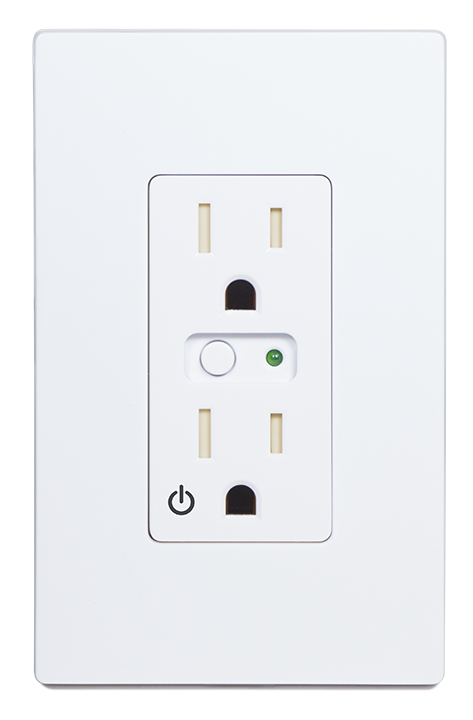
Name | WO15EMZ5-1 |
|---|
Short Description | The Smart Wall Outlet replaces any in wall outlet and adds Z-Wave Home Automaton capability and the ability to control devices plugged into it. |
|---|
Long Description | The WO15EMZ5-1 Wall Mounted Outlet is a Tamper resistant grounded duplex receptacle that meets the 2008 NEC requirement and is easily wired in place of a standard wall outlet. A shutter mechanism inside the receptacle blocks access to the contacts unless a 2 prong plug is inserted. This Wall Mounted Outlet integrates with other Nortek Z-Wave enabled products, and also acts as a wireless repeater. This device supports Energy Monitoring. With Over The Air upgrading supported, this device can be seamlessly updated to the most recent firmware and software features. Finally, as a Z-Wave plus product, it’s 30% longer range is ideal for easily creating a strong Z-Wave mesh network for an easier installation and more reliable operation. |
|---|
Brand | GoControl |
|---|
Product Identifier | WO15EMZ5-1 |
|---|
OEM Version | HW: 1 FW: 1.35 |
|---|
Hardware Platform | ZM5202 |
|---|
Z-Wave Version | 6.51.10 |
|---|
Library Type | SLAVE_ENHANCED_232 |
|---|
Device Type | On/Off Power Switch |
|---|
Role Type | ROLE_TYPE_SLAVE_ALWAYS_ON |
|---|
Manufacturer ID | 0x014f |
|---|
Product Type ID | 0x574F |
|---|
Product ID | 0x3535 |
|---|
User Icon | 0x0700 |
|---|
Installer Icon | 0x0700 |
|---|
Frequency Plans | US: 916.00MHz, 908.40MHz |
|---|
Categories | Energy Meters, All Lighting Devices, Lighting Accessories |
|---|
Countries / Regions | United States of America |
|---|
Supported Command Classes | Identifier | Name | Key | Version |
|---|
COMMAND_CLASS_SCENE_ACTUATOR_CONF | Scene Actuator Conf | 0x2C | 1 | COMMAND_CLASS_POWERLEVEL | Powerlevel | 0x73 | 1 | COMMAND_CLASS_SWITCH_ALL | Switch All | 0x27 | 1 | COMMAND_CLASS_SWITCH_BINARY | Switch Binary | 0x25 | 1 | COMMAND_CLASS_BASIC | Basic | 0x20 | 1 | COMMAND_CLASS_VERSION_V2 | Version V2 | 0x86 | 2 | COMMAND_CLASS_DEVICE_RESET_LOCALLY | Device Reset Locally | 0x5A | 1 | COMMAND_CLASS_ZWAVEPLUS_INFO_V2 | Z-Wave Plus Info V2 | 0x5E | 2 | COMMAND_CLASS_ASSOCIATION_V2 | Association V2 | 0x85 | 2 | COMMAND_CLASS_ASSOCIATION_GRP_INFO | Association Group Info | 0x59 | 1 | COMMAND_CLASS_BASIC_V2 | Basic V2 | 0x20 | 2 | COMMAND_CLASS_CONFIGURATION_V3 | Configuration V3 | 0x70 | 3 | COMMAND_CLASS_SCENE_ACTIVATION | Scene Activation | 0x2B | 1 | COMMAND_CLASS_FIRMWARE_UPDATE_MD_V2 | Firmware Update Meta-Data V2 | 0x7A | 2 | COMMAND_CLASS_MANUFACTURER_SPECIFIC_V2 | Manufacturer Specific V2 | 0x72 | 2 | COMMAND_CLASS_METER_V4 | Meter V4 | 0x32 | 4 |
|
|---|
Documents | Category | Description | File |
|---|
Manual_Primary_Lang | Product or Owner's Manual | |
|
|---|
Features | Feature | Values |
|---|
Supported Meter Type | | Switch Type | Value |
|---|
Push Button with Indicator |
| Color | | Electric Load Type | Value |
|---|
Incandescent | Fluorescent | MLV (Magnetic) | ELV (Electronic) | LED |
| Firmware Updatable | Value |
|---|
Updatable by Consumer by RF |
| Neutral Wire Required | |
|
|---|
Association Groups | Group Number | Maximum Nodes Supported | End Point ID | Description |
|---|
1 | 5 | 0 | Z-Wave Plus Lifeline |
|
|---|
Configuration Parameters | Parameter Number | Name | Description | Format | Size | Min Value | Max Value | Default Value | Parameter Values |
|---|
3 | Night Light | Configure Night Light function. | 0 | 1 | 0 | 0 | 0 | From | To | Description |
|---|
0 | 0 | LED OFF when the load is on, and ON when the load is off | 1 | 1 | LED ON when the load is on, and OFF when the load is off | 2 | 2 | LED is always on | 3 | 3 | LED is always off | 4 | 4 | LED blinks during RF transmissions from or to the device |
|
|
|---|
Texts | ID | Description | Value |
|---|
1 | Inclusion | Refer to your Controller operating instructions to add this switch under the command of the Wireless Controller.
1. With your Controller in Discovery or Add Mode, tap the button on the face of the outlet. The LED will blink slowly when in ADD Mode.
2. You should see an indication on your Controller that the “device was added” to the network and the LED will stop blinking.
3. The device will appear in the list of Switches. It should display as a switch.
If the Controller/Gateway shows the addition failed, repeat Steps 1-3. | 2 | Exclusion | The WO15EMZ5-1 can be removed from the network by the controller/Gateway. Refer to the Controller operating instructions for details.
1. Set the Controller into Removal Mode and follow its instruction to delete the
WO15EMZ5-1 from the Controller.
2. Remove the switch by tapping the button on the face of the outlet 2 times. The LED will begin blinking slowly for 10 seconds indicating that it has been removed.
3. You should see an indication on your Controller that the “device was removed” from the network. | 5 | Factory Reset | In the event that your primary Controller is lost or otherwise inoperable, to reset the
WO15EMZ5-1 and clear all network information, follow these steps:
1. Tap the button on the face of the outlet fi ve (5) times.
2. Press and hold the button for 15 seconds. The LED will increasingly blink faster to indicate that a Reset is taking place.
3. LED will turn off when reset is complete. |
|
|---|
Supported / Controlled Meter Types | Meter Type | Rate Type | Description |
|---|
Electric meter | Import | Electric Meter Consumption |
|
|---|
Supports NWI | Yes |
|---|
Supports Explorer Frames | Yes |
|---|