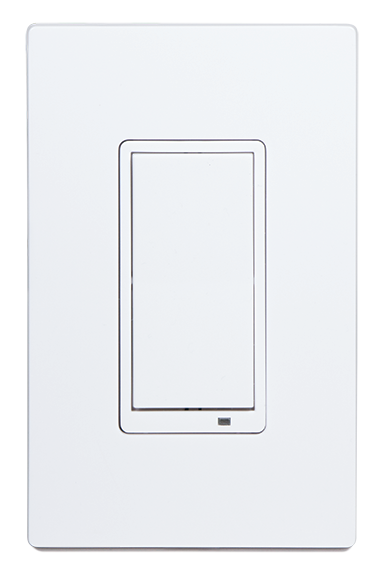
Product Recognition | |
|---|
Certification Number | ZC10-17045537 |
|---|
Name | WS15Z5-1 |
|---|
Short Description | WS15Z5-1 Smart in-wall switch controls the connected load and can run up to 8 scenes using the Central Scene Command Class creating the perfect whole house environment. |
|---|
Long Description | The WS15Z5-1 is a Smart in-wall switch designed providing the ideal mood for every situation for the entire home. Not only can this switch control the connected load, with Central Scene support it can run up to 8 scenes created by the Hub, making the familiar light switch the most versatile Home Automation light switch available. It can essentially control lights and devices throughout the entire home. With Over The Air upgrading supported, this device can be seamlessly updated to the most recent firmware and software features. Finally, as a Z-Wave plus product, it’s 30% longer range is ideal for easily creating a strong Z-Wave mesh network for an easier installation and more reliable operation. |
|---|
Brand | GoControl |
|---|
Product Identifier | WS15Z5-1 |
|---|
OEM Version | HW: 255 FW: 1.26 |
|---|
Hardware Platform | ZM5202 |
|---|
Z-Wave Version | 6.51.09 |
|---|
Library Type | SLAVE_ENHANCED_232 |
|---|
Device Type | On/Off Power Switch |
|---|
Role Type | ROLE_TYPE_SLAVE_ALWAYS_ON |
|---|
Manufacturer ID | 0x014F |
|---|
Product Type ID | 0x5753 |
|---|
Product ID | 0x3535 |
|---|
User Icon | 0x0700 |
|---|
Installer Icon | 0x0700 |
|---|
Frequency Plans | US: 916.00MHz, 908.40MHz |
|---|
Categories | All Lighting Devices, On/Off Switches/Devices |
|---|
Countries / Regions | United States of America |
|---|
Supported Command Classes | Identifier | Name | Key | Version |
|---|
COMMAND_CLASS_SCENE_ACTUATOR_CONF | Scene Actuator Conf | 0x2C | 1 | COMMAND_CLASS_POWERLEVEL | Powerlevel | 0x73 | 1 | COMMAND_CLASS_SWITCH_ALL | Switch All | 0x27 | 1 | COMMAND_CLASS_SWITCH_BINARY | Switch Binary | 0x25 | 1 | COMMAND_CLASS_VERSION_V2 | Version V2 | 0x86 | 2 | COMMAND_CLASS_DEVICE_RESET_LOCALLY | Device Reset Locally | 0x5A | 1 | COMMAND_CLASS_ZWAVEPLUS_INFO_V2 | Z-Wave Plus Info V2 | 0x5E | 2 | COMMAND_CLASS_ASSOCIATION_V2 | Association V2 | 0x85 | 2 | COMMAND_CLASS_ASSOCIATION_GRP_INFO | Association Group Info | 0x59 | 1 | COMMAND_CLASS_BASIC_V2 | Basic V2 | 0x20 | 2 | COMMAND_CLASS_CONFIGURATION_V3 | Configuration V3 | 0x70 | 3 | COMMAND_CLASS_CENTRAL_SCENE_V2 | Central Scene V2 | 0x5B | 2 | COMMAND_CLASS_SCENE_ACTIVATION | Scene Activation | 0x2B | 1 | COMMAND_CLASS_FIRMWARE_UPDATE_MD_V2 | Firmware Update Meta-Data V2 | 0x7A | 2 | COMMAND_CLASS_MANUFACTURER_SPECIFIC_V2 | Manufacturer Specific V2 | 0x72 | 2 |
|
|---|
Controlled Command Classes | Identifier | Name | Key | Version |
|---|
COMMAND_CLASS_BASIC_V2 | Basic V2 | 0x20 | 2 |
|
|---|
Documents | Category | Description | File |
|---|
Manual_Primary_Lang | Product or Owner's Manual | |
|
|---|
Features | Feature | Values |
|---|
Color | | Electric Load Type | | Neutral Wire Required | | Z-Wave Scene Type | |
|
|---|
Association Groups | Group Number | Maximum Nodes Supported | End Point ID | Description |
|---|
1 | 5 | 0 | Z-Wave Plus Lifeline | 2 | 5 | 0 | Other Non-Dimming devices | 3 | 5 | 0 | Dimmers |
|
|---|
Configuration Parameters | Parameter Number | Name | Description | Format | Size | Min Value | Max Value | Default Value | Parameter Values |
|---|
3 | Night Light | The LED Night Light on the WS15Z5-1 will turn OFF when the load attached is turned ON. To make the LED turn ON when the load attached is turned ON. | 0 | 1 | 0 | 0 | 0 | From | To | Description |
|---|
0 | 4 | 0 - LED OFF when the load is on, and ON when the load is off. 1 - LED ON when the load is on, and OFF when the load is off. 2 - LED is always on. 3 - LED is always off. 4 - LED blinks during RF transmissions from or to the device. |
| 4 | Invert Switch | To change the top of the switch to OFF and the bottom of the switch ON. | 0 | 1 | 0 | 0 | 0 | From | To | Description |
|---|
0 | 1 | 0 - Top of switch is ON, bottom of switch is OFF. 1 - Bottom of switch is ON, top of switch is OFF |
|
|
|---|
Texts | ID | Description | Value |
|---|
5 | Factory Reset | To reset the WS15Z5-1 and clear all network information, follow these steps:
1. Tap the top of the switch fi ve (5) times.
2. Press and hold the bottom of the switch for 15 seconds. The LED will increasingly blink faster to indicate that a Reset is taking place. | 1 | Inclusion | With your Controller in Discovery or Add Mode, tap the switch. The LED will blink slowly when in ADD Mode.
You should see an indication on your Controller that the “device was added” to
the network and the LED will stop blinking.
The device will appear in the list of Switches. It should display as a switch. | 2 | Exclusion | Set the Controller into Removal Mode and follow its instruction to delete the
WS15Z5-1 from the Controller.
Remove the switch by tapping the paddle 2 times. The LED will begin blinking
slowly for 10 seconds indicating that it has been removed.
You should see an indication on your Controller that the “device was removed”
from the network. |
|
|---|
Supports NWI | Yes |
|---|
Supports Explorer Frames | Yes |
|---|
Radio Range Z-Wave (m) | 40 |
|---|