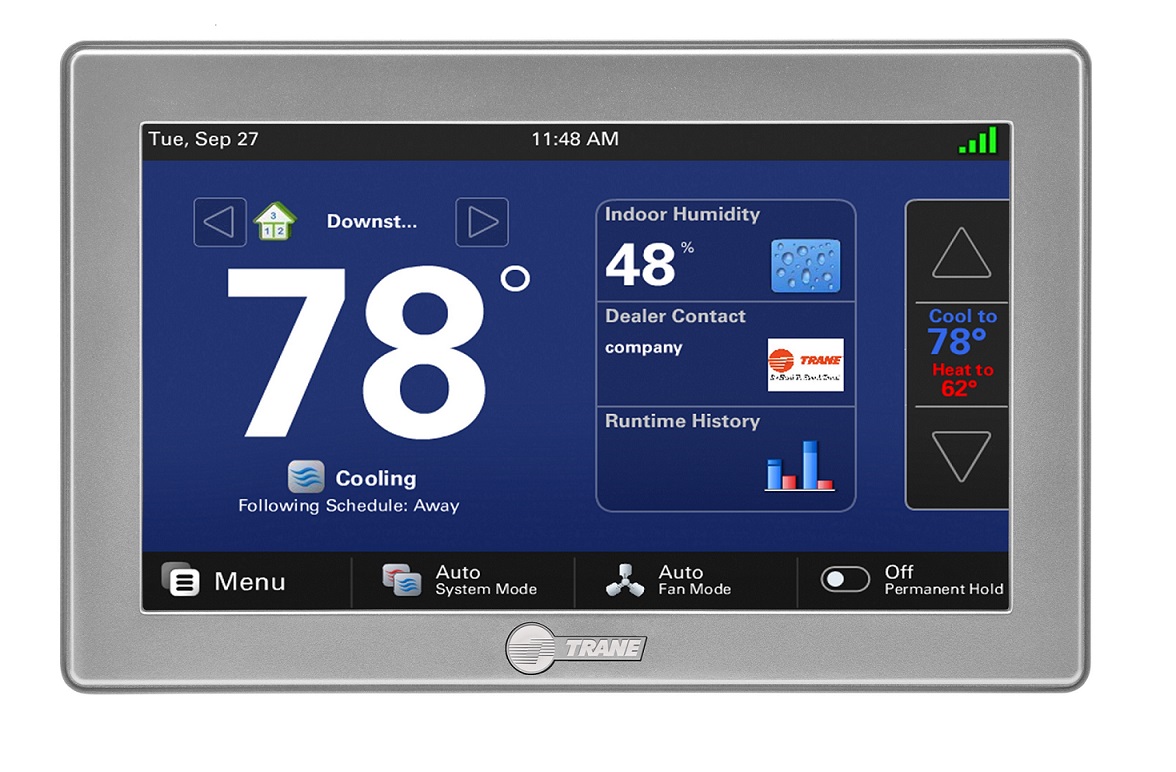
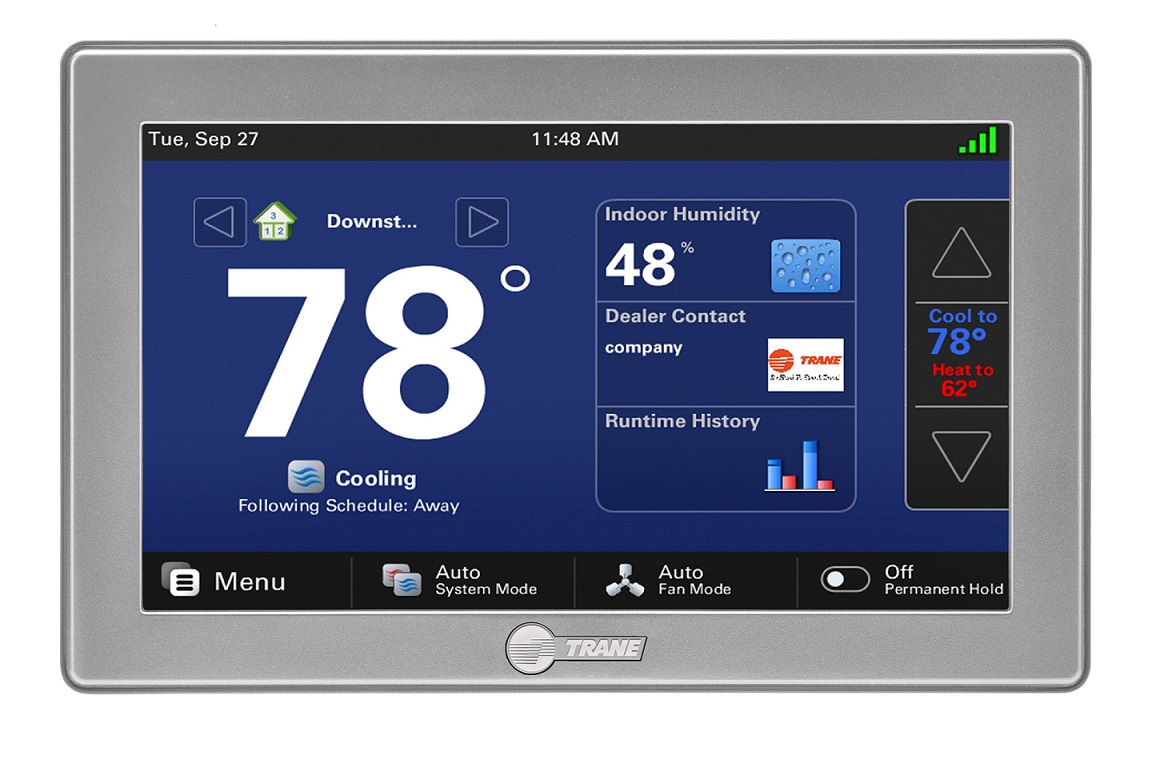
| Product Recognition | |
|---|
| Certification Number | ZC10-16115301 |
|---|
| Name | XL1050 |
|---|
| Short Description | Embedded within the XL1050 comfort control is a secure Z-Wave Plus Central Static Controller designed to enable remote control of a Z-Wave network from the Nexia Home Intelligence web portal. |
|---|
| Long Description | When enrolled to a Nexia Home Intelligence account, the XL1050 is a Z-Wave Plus security-enabled device that can serve as a central hub for an entire network of home automation devices, including all non-battery powered devices that will act as repeaters on your network. Your XL1050 can also display local weather conditions, five-day forecasts and National Weather Service warnings and alerts. |
|---|
| Brand | Trane |
|---|
| Product Identifier | TZON1050AC52ZAA |
|---|
| OEM Version | HW: 1 FW: 22.12:22.12 |
|---|
| Hardware Platform | ZM5202 |
|---|
| Z-Wave Version | 6.51.08 |
|---|
| Library Type | CONTROLLER_STATIC |
|---|
| Device Type | Central Controller |
|---|
| Role Type | ROLE_TYPE_CONTROLLER_CENTRAL_STATIC |
|---|
| Manufacturer ID | 0x008B |
|---|
| Product Type ID | 0x5441 |
|---|
| Product ID | 0x3530 |
|---|
| User Icon | 0x0100 |
|---|
| Installer Icon | 0x0100 |
|---|
| Frequency Plans | US: 916.00MHz, 908.40MHz |
|---|
| Categories | All Controllers, Gateway Controller |
|---|
| Countries / Regions | United States of America |
|---|
| Supported Command Classes | | Identifier | Name | Key | Version |
|---|
| COMMAND_CLASS_POWERLEVEL | Powerlevel | 0x73 | 1 | | COMMAND_CLASS_CONTROLLER_REPLICATION | Controller Replication | 0x21 | 1 | | COMMAND_CLASS_APPLICATION_STATUS | Application Status | 0x22 | 1 | | COMMAND_CLASS_CRC_16_ENCAP | CRC16 Encapsulation | 0x56 | 1 | | COMMAND_CLASS_SECURITY | Security S0 | 0x98 | 1 | | COMMAND_CLASS_VERSION_V2 | Version V2 | 0x86 | 2 | | COMMAND_CLASS_DEVICE_RESET_LOCALLY | Device Reset Locally | 0x5A | 1 | | COMMAND_CLASS_ZWAVEPLUS_INFO_V2 | Z-Wave Plus Info V2 | 0x5E | 2 | | COMMAND_CLASS_ASSOCIATION_V2 | Association V2 | 0x85 | 2 | | COMMAND_CLASS_ASSOCIATION_GRP_INFO | Association Group Info | 0x59 | 1 | | COMMAND_CLASS_MANUFACTURER_SPECIFIC_V2 | Manufacturer Specific V2 | 0x72 | 2 |
|
|---|
| Controlled Command Classes | | Identifier | Name | Key | Version |
|---|
| COMMAND_CLASS_SENSOR_BINARY | Sensor Binary | 0x30 | 1 | | COMMAND_CLASS_SENSOR_MULTILEVEL_V5 | Sensor Multilevel V5 | 0x31 | 5 | | COMMAND_CLASS_DOOR_LOCK | Door Lock | 0x62 | 1 | | COMMAND_CLASS_THERMOSTAT_FAN_MODE_V4 | Thermostat Fan Mode V4 | 0x44 | 4 | | COMMAND_CLASS_THERMOSTAT_OPERATING_STATE_V2 | Thermostat Operating State V2 | 0x42 | 2 | | COMMAND_CLASS_USER_CODE | User Code | 0x63 | 1 | | COMMAND_CLASS_MULTI_CHANNEL_ASSOCIATION_V3 | Multi-Channel Association V3 | 0x8E | 3 | | COMMAND_CLASS_CLOCK | Clock | 0x81 | 1 | | COMMAND_CLASS_BATTERY | Battery | 0x80 | 1 | | COMMAND_CLASS_THERMOSTAT_MODE | Thermostat Mode | 0x40 | 1 | | COMMAND_CLASS_SWITCH_BINARY | Switch Binary | 0x25 | 1 | | COMMAND_CLASS_BASIC | Basic | 0x20 | 1 | | COMMAND_CLASS_CONFIGURATION | Configuration | 0x70 | 1 | | COMMAND_CLASS_HAIL | Hail | 0x82 | 1 | | COMMAND_CLASS_CRC_16_ENCAP | CRC16 Encapsulation | 0x56 | 1 | | COMMAND_CLASS_SECURITY | Security S0 | 0x98 | 1 | | COMMAND_CLASS_CENTRAL_SCENE | Central Scene | 0x5B | 1 | | COMMAND_CLASS_NOTIFICATION_V3 | Notification V3 | 0x71 | 3 | | COMMAND_CLASS_THERMOSTAT_SETPOINT_V2 | Thermostat Setpoint V2 | 0x43 | 2 | | COMMAND_CLASS_VERSION_V2 | Version V2 | 0x86 | 2 | | COMMAND_CLASS_WAKE_UP_V2 | Wake Up V2 | 0x84 | 2 | | COMMAND_CLASS_DEVICE_RESET_LOCALLY | Device Reset Locally | 0x5A | 1 | | COMMAND_CLASS_ZWAVEPLUS_INFO_V2 | Z-Wave Plus Info V2 | 0x5E | 2 | | COMMAND_CLASS_SWITCH_MULTILEVEL_V3 | Switch Multilevel V3 | 0x26 | 3 | | COMMAND_CLASS_ASSOCIATION_V2 | Association V2 | 0x85 | 2 | | COMMAND_CLASS_MULTI_CHANNEL_V4 | Multi-Channel V4 | 0x60 | 4 | | COMMAND_CLASS_METER | Meter | 0x32 | 1 | | COMMAND_CLASS_SCREEN_MD | Screen Meta-Data | 0x92 | 1 | | COMMAND_CLASS_FIRMWARE_UPDATE_MD_V2 | Firmware Update Meta-Data V2 | 0x7A | 2 | | COMMAND_CLASS_MANUFACTURER_SPECIFIC_V2 | Manufacturer Specific V2 | 0x72 | 2 | | COMMAND_CLASS_MULTI_CMD | Multi-Command | 0x8F | 1 |
|
|---|
| Documents | | Category | Description | File |
|---|
| Manual_Primary_Lang | Product or Owner's Manual | 32-5093-01.pdf |
|
|---|
| Features | | Feature | Values |
|---|
| Communications Protocol | | | Color | | | Firmware Updatable | | Value |
|---|
| Updatable by Consumer via Internet |
|
|
|---|
| Association Groups | | Group Number | Maximum Nodes Supported | End Point ID | Description |
|---|
| 1 | 5 | 0 | Z-Wave Plus Lifeline.
A Device Reset Locally Notification is sent to associated nodes when the bridge is factory reset. |
|
|---|
| Texts | | ID | Description | Value |
|---|
| 24 | Controller Exclusion | From the HOME Screen, press MENU on the control, then press NEXIA.
Next press REMOVE DEVICE and follow the device manufacturer's instructions for setting the Z-Wave device into learn mode. You will have four minutes to set the device into learn mode after pressing the REMOVE DEVICE button. | | 23 | Controller Inclusion | From the HOME Screen, press MENU on the control, then press NEXIA.
Next press ADD DEVICE and follow the device manufacturer's instructions for setting the Z-Wave device into learn mode. You will have four minutes to set the device into learn mode after pressing the ADD DEVICE button. | | 3 | Learn Mode (adding another controller) | Follow the device manufacturer's instructions of your primary controller for putting the controller into inclusion mode.
From the HOME Screen, press MENU on the control, then press NEXIA.
Press ADVANCED, then LEARN. Your XL1050 will be added to the network of your primary controller. | | 5 | Factory Reset | From the HOME Screen, press MENU on the control, then press NEXIA.
Press ADVANCED, then FACTORY RESET.
If this bridge is being used as a secondary or inclusion controller in the network, please reset this bridge only in the event that the primary controller is missing or otherwise inoperable. |
|
|---|
| Supports NWI | Yes |
|---|
| Supports Explorer Frames | Yes |
|---|