Product Recognition | |
|---|
Certification Number | ZC10-14090011 |
|---|
Name | Xuan |
|---|
Short Description | An Internet of Things gateway/hub with support of Z-Wave Plus and other communication protocols |
|---|
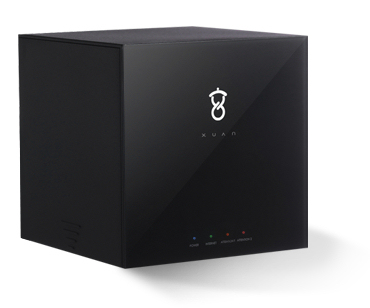
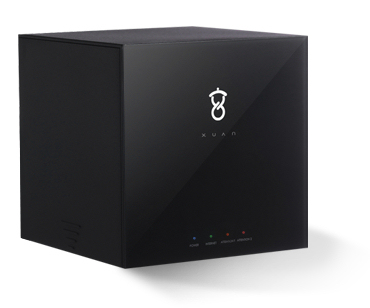
Long Description | The STACK Box is a A Smart Home Controller. The STACK Box connects all your smart devices that control your homes lighting, energy, audio, video, security, healthcare and wearable's. The controller can be accessed locally and remotely with your smartphone and, or tablet. |
|---|
Brand | Xuan |
|---|
Product Identifier | STACK Box |
|---|
OEM Version | 1 |
|---|
Hardware Platform | ZM5304 |
|---|
Z-Wave Version | 6.51.02 |
|---|
Library Type | CONTROLLER_STATIC |
|---|
Device Type | Central Controller |
|---|
Role Type | ROLE_TYPE_CONTROLLER_CENTRAL_STATIC |
|---|
Manufacturer ID | 0x0200 |
|---|
Product Type ID | 0x0001 |
|---|
Product ID | 0x0001 |
|---|
Frequency Plans | US: 916.00MHz, 908.40MHz |
|---|
Categories | All Controllers, Gateway Controller |
|---|
Countries / Regions | United States of America |
|---|
Controlled Command Classes | Identifier | Name | Key | Version |
|---|
COMMAND_CLASS_SENSOR_BINARY | Sensor Binary | 0x30 | 1 | COMMAND_CLASS_ASSOCIATION | Association | 0x85 | 1 | COMMAND_CLASS_SWITCH_MULTILEVEL | Switch Multilevel | 0x26 | 1 | COMMAND_CLASS_ASSOCIATION_GROUP_INFORMATION | Association Group Information V1 | 0x59 | 0 | COMMAND_CLASS_DOOR_LOCK | Door Lock | 0x62 | 1 | COMMAND_CLASS_THERMOSTAT_FAN_MODE | Thermostat Fan Mode | 0x44 | 1 | COMMAND_CLASS_USER_CODE | User Code | 0x63 | 1 | COMMAND_CLASS_MULTI_CHANNEL | Multi-Channel V1 | 0x60 | 0 | COMMAND_CLASS_BATTERY | Battery | 0x80 | 1 | COMMAND_CLASS_WAKE_UP | Wake Up | 0x84 | 1 | COMMAND_CLASS_THERMOSTAT_SETBACK | Thermostat Setback | 0x47 | 1 | COMMAND_CLASS_THERMOSTAT_OPERATING_STATE | Thermostat Operating State | 0x42 | 1 | COMMAND_CLASS_THERMOSTAT_MODE | Thermostat Mode | 0x40 | 1 | COMMAND_CLASS_THERMOSTAT_FAN_STATE | Thermostat Fan State | 0x45 | 1 | COMMAND_CLASS_SENSOR_MULTILEVEL | Sensor Multilevel | 0x31 | 1 | COMMAND_CLASS_SWITCH_BINARY | Switch Binary | 0x25 | 1 | COMMAND_CLASS_BASIC | Basic | 0x20 | 1 | COMMAND_CLASS_CONFIGURATION | Configuration | 0x70 | 1 | COMMAND_CLASS_CRC_16_ENCAP | CRC16 Encapsulation | 0x56 | 1 | COMMAND_CLASS_SECURITY | Security S0 | 0x98 | 1 | COMMAND_CLASS_NOTIFICATION | Notification V1 | 0x71 | 0 | COMMAND_CLASS_THERMOSTAT_SETPOINT | Thermostat Setpoint | 0x43 | 1 | COMMAND_CLASS_METER | Meter | 0x32 | 1 | COMMAND_CLASS_VERSION | Version | 0x86 | 1 |
|
|---|
Documents | Category | Description | File |
|---|
Manual_Primary_Lang | Product or Owner's Manual | |
|
|---|
Association Groups | Group Number | Maximum Nodes Supported | End Point ID | Description |
|---|
1 | 5 | 0 | Z-Wave Plus Lifeline |
|
|---|
Texts | ID | Description | Value |
|---|
24 | Controller Exclusion | To remove the STACK Box from an existing Z-Wave Network as a secondary controller, follow the instructions in your primary controller's user manual to put the controller into exclusion mode, and then from the top level menu of the STACK Box web interface, select 'Learn' to initiate exclusion on the STACK Box. | 3 | Learn Mode (adding another controller) | If the STACK Box is a primary controller, use the menu option ""Add"" from the top level menu of the STACK Box web interface to add any device or and secondary controller from the STACK Box Z-Wave network. Use the menu option ""Exclude"" from the top level menu of the STACK Box web interface to remove any device or and secondary controller from the STACK Box Z-Wave network. | 23 | Controller Inclusion | To add the STACK Box to an existing Z-Wave Network and use the STACK Box as a secondary controller, follow the instructions in your primary controller's user manual to put the controller into inclusion mode, and then from the top level menu of the STACK Box web interface, select 'Learn' to initiate inclusion on the STACK Box. | 5 | Factory Reset | Use this procedure only in the event that the network primary controller is lost or otherwise inoperable.
At the back of the box, look for ""Reset"" mark. Use a sharp pin to press inside the hole above the mark for more than 4s. | 4 | Device Wake-Up | N/A | 6 | Additional Special Features | N/A |
|
|---|
Supports NWI | Yes |
|---|
Supports Explorer Frames | Yes |
|---|
Radio Range Z-Wave (m) | 40 |
|---|