Product Recognition | |
|---|
Certification Number | ZC12-20080088 |
|---|
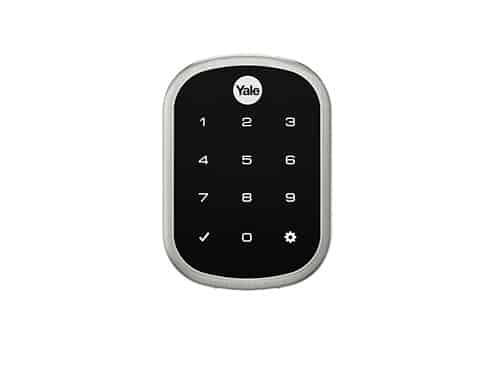
Name | Yale Assure SL Lock |
|---|
Short Description | Lock and unlock your door with ease using the touchscreen keypad. Integrate your Yale lock into your Z-Wave home automation or security system for ultimate convenience. |
|---|
Long Description | Never worry about carrying around or losing your keys again. Unlock and lock your home with ease from the backlit touchscreen keypad. Create unique pin codes for friends and family and remove codes whenever you need to. This Yale Real Living lock features Z-Wave technology and seamlessly integrates into 50+ home automation and security systems. When added to most Z-Wave automation systems, lock and unlock your door, create pin codes, view access history and receive notifications from anywhere. The lock is tamper resistant, easy to install and even easier to use! |
|---|
Brand | Yale |
|---|
Product Identifier | YRD256-ZW3 |
|---|
Product Line | Yale Assure |
|---|
OEM Version | HW: 2 FW: 2.11:43.16 |
|---|
Hardware Platform | ZGM130 |
|---|
Z-Wave Version | 7.12.2 |
|---|
Library Type | SLAVE_ENHANCED_232 |
|---|
Device Type | Lock |
|---|
Role Type | ROLE_TYPE_SLAVE_SLEEPING_LISTENING |
|---|
Manufacturer ID | 0x0129 |
|---|
Product Type ID | 0x8002 |
|---|
Product ID | 0xA570 |
|---|
User Icon | 0x0300 |
|---|
Installer Icon | 0x0300 |
|---|
Frequency Plans | US: 916.00MHz, 908.40MHz |
|---|
Categories | Locks |
|---|
Countries / Regions | United States of America |
|---|
Supported Command Classes | Identifier | Name | Key | Version |
|---|
COMMAND_CLASS_CONFIGURATION_V4 | Configuration V4 | 0x70 | 4 | COMMAND_CLASS_POWERLEVEL | Powerlevel | 0x73 | 1 | COMMAND_CLASS_DOOR_LOCK_V4 | Door Lock V4 | | 0 | COMMAND_CLASS_USER_CODE_V2 | User Code V2 | | 0 | COMMAND_CLASS_MULTI_CHANNEL_ASSOCIATION_V3 | Multi-Channel Association V3 | 0x8E | 3 | COMMAND_CLASS_INDICATOR_V3 | Indicator V3 | 0x87 | 3 | COMMAND_CLASS_CLOCK | Clock | 0x81 | 1 | COMMAND_CLASS_BATTERY | Battery | 0x80 | 1 | COMMAND_CLASS_APPLICATION_STATUS | Application Status | 0x22 | 1 | COMMAND_CLASS_TIME_PARAMETERS | Time Parameters | 0x8B | 1 | COMMAND_CLASS_SECURITY | Security S0 | 0x98 | 1 | COMMAND_CLASS_TIME_V2 | Time V2 | 0x8A | 2 | COMMAND_CLASS_TRANSPORT_SERVICE_V2 | Transport Service V2 | 0x55 | 2 | COMMAND_CLASS_DEVICE_RESET_LOCALLY | Device Reset Locally | 0x5A | 1 | COMMAND_CLASS_ZWAVEPLUS_INFO_V2 | Z-Wave Plus Info V2 | 0x5E | 2 | COMMAND_CLASS_ASSOCIATION_V2 | Association V2 | 0x85 | 2 | COMMAND_CLASS_FIRMWARE_UPDATE_MD_V5 | Firmware Update Meta-Data V5 | 0x7A | 5 | COMMAND_CLASS_ASSOCIATION_GRP_INFO_V3 | Association Group Information V3 | 0x59 | 3 | COMMAND_CLASS_NOTIFICATION_V8 | Notification V8 | 0x71 | 8 | COMMAND_CLASS_BASIC_V2 | Basic V2 | 0x20 | 2 | COMMAND_CLASS_DOOR_LOCK_LOGGING | Door Lock Logging | 0x4C | 1 | COMMAND_CLASS_SECURITY_2 | Security S2 | 0x9F | 1 | COMMAND_CLASS_VERSION_V3 | Version V3 | 0x86 | 3 | COMMAND_CLASS_SUPERVISION | Supervision | 0x6C | 1 | COMMAND_CLASS_MANUFACTURER_SPECIFIC_V2 | Manufacturer Specific V2 | 0x72 | 2 | COMMAND_CLASS_SCHEDULE_ENTRY_LOCK_V3 | Schedule Entry Lock V3 | 0x4E | 3 |
|
|---|
S2 Classes | S2_ACCESS_CONTROL |
|---|
Documents | Category | Description | File |
|---|
Manual_English | Product Manual in English | | Manual_Primary_Lang | Product Manual | |
|
|---|
Features | Feature | Values |
|---|
Firmware Updatable | Value |
|---|
Updatable by Consumer by RF |
| Sensors | | Battery Quantity | | IP (Ingress Protection) Rated | | Door Lock Type | | Battery Type | | Color | | Supported Notification Types | Value |
|---|
Access Control | Power Management |
| Outdoor Use | |
|
|---|
Association Groups | Group Number | Maximum Nodes Supported | End Point ID | Group Name | Profile | Description |
|---|
1 | 5 | 0 | Lifeline | 0x0001 | Command_Class_Battery
o Battery_Report
Command_Class_Configuration
o Configuration_Report
Command_Class_Notification
o Notification_Report
Command_Class_Door_Lock
o Door_Lock_Operation_Report
o Door_Lock_Configuration_Report
Command_Class_Device_Reset_Locally
o Device_Reset_Locally_Notification
Command_Class_Indicator
o Indicator_Report
Command_Class_User_Code
o User Code Report
Command_Class_Clock
o Clock_Report
Notifications Table
Table 2 - Notifications Table
Alarm Reports
Alarm
type
Alarm
Level
Description |
|
|---|
Configuration Parameters | Parameter Number | Name | Description | Format | Flag Advanced | Size | Min Value | Max Value | Default Value | Parameter Values |
|---|
1 | Volume | Set Volume Level to high (1), low (2), or silent (3). | 0 | Yes | 1 | 1 | 3 | 2 | From | To | Description |
|---|
1 | 3 | Sound level |
| 4 | Wrong Code Entry Limit | 3 to 10 default is 5 times | 0 | | 1 | 3 | 10 | 5 | From | To | Description |
|---|
3 | 10 | Times |
| 2 | Auto Relock on/off | 0x00 = OFF, 0xFF = ON default is 0x00 or OFF | 0 | | 1 | 0 | 255 | 0 | From | To | Description |
|---|
0 | 255 | Auto Relock On | 0 | 0 | Auto Relock OFF |
| 5 | Language | 1=English, 2=Spanish, 3=French default is 1= English | 0 | | 1 | 1 | 3 | 1 | From | To | Description |
|---|
1 | 1 | English | 2 | 2 | Spanish | 3 | 3 | French |
| 7 | Shut Down Time (After wrong codes) | 10 to 132 seconds default is 60 seconds | 0 | | 1 | 10 | 132 | 60 | From | To | Description |
|---|
10 | 132 | Seconds |
| 8 | Operating Mode | 00 = normal mode (this is the default mode) 01 = vacation mode, keypad lockout 02 = privacy mode, no keypad. RF Unlock will work | 0 | | 1 | 0 | 2 | 0 | From | To | Description |
|---|
0 | 0 | Normal Mode | 1 | 1 | Vacation Mode | 2 | 2 | Privacy Mode |
| 11 | One Touch Locking | 0x00 = OFF, 0xFF = ON default is 0xFF or ON. | 0 | | 1 | 0 | 255 | 255 | From | To | Description |
|---|
0 | 0 | One Touch Locking Off | 255 | 255 | One Touch Locking On |
|
|
|---|
Texts | ID | Description | Value |
|---|
1 | Classic Inclusion | Install Yale Smart Module into slot above battery compartment
IMPORTANT: Batteries must be removed before inserting Yale Smart Module:
• Remove battery cover
• Remove batteries
• Insert Yale Smart Module
• Reinstall batteries
• Reinstall battery cover
2. Open Z-Wave system's smart home or alarm app on your smartphone or tablet
3. If you have Smart Start* enabled with your Z-Wave System follow in-app prompts to add a new device
If you don't have smart start or are not sure, follow steps 4 - 6
4. On your lock keypad, enter your master entry code followed by the gear icon
5. Press the 7 key followed by the gear icon
6. Press the 1 key followed by the gear icon | 4 | Wake-Up Procedure | Press Yale logo to wake up lock | 5 | Factory Reset Procedure | Remove the battery cover and batteries.
Remove the interior escutcheon to access the reset button.
The reset button is located above the PCB cable connector.
While pressing the reset button for a minimum of 3 seconds, reinstall batteries. Release reset button.
Replace battery cover.
Please use this procedure only when the network primary controller is missing or otherwise inoperable | 2 | Classic Exclusion | Open Z-Wave system's smart home or alarm app and follow instructions for removing a device
2. On your lock keypad, enter your master entry code followed by the icon
3. Press the 7 key followed by the gear icon
4. Press the 3 key followed by the gear icon | 8 | Where to find S2 DSK on product | Sticker on module and insert |
|
|---|
Supported Notification Types | Notification Type | Event / State |
|---|
Access Control | (Refer to parameters): State idle | Access Control | Manual lock operation | Access Control | Manual unlock operation | Access Control | RF lock operation | Access Control | RF unlock operation | Access Control | Keypad lock operation | Access Control | Keypad unlock operation | Access Control | Manual not fully locked operation | Access Control | RF not fully locked operation | Access Control | Auto lock locked operation | Access Control | Auto lock not fully locked operation | Access Control | Lock state: Lock jammed | Access Control | All user codes deleted | Access Control | Single user code deleted | Access Control | New user code added | Access Control | New user code not added due to duplicate code | Access Control | Keypad state: Keypad temporary disabled | Access Control | Keypad state: Keypad busy | Access Control | New program code entered : unique code for lock configuration | Access Control | Manually enter user access code exceeds code limit | Access Control | Unlock by RF with invalid user code | Access Control | Locked by RF with invalid user code | Access Control | Door state: Window/door is open | Access Control | Door state: Window/door is closed | Power Management | Power status: Power has been applied | Power Management | Battery maintenance status: Replace battery soon | Power Management | Battery maintenance status: Replace battery now |
|
|---|
Supports NWI | Yes |
|---|
Supports Explorer Frames | Yes |
|---|
Is Flirs | Yes |
|---|
Supports SmartStart | Yes |
|---|
Radio Range Z-Wave (m) | 40 |
|---|