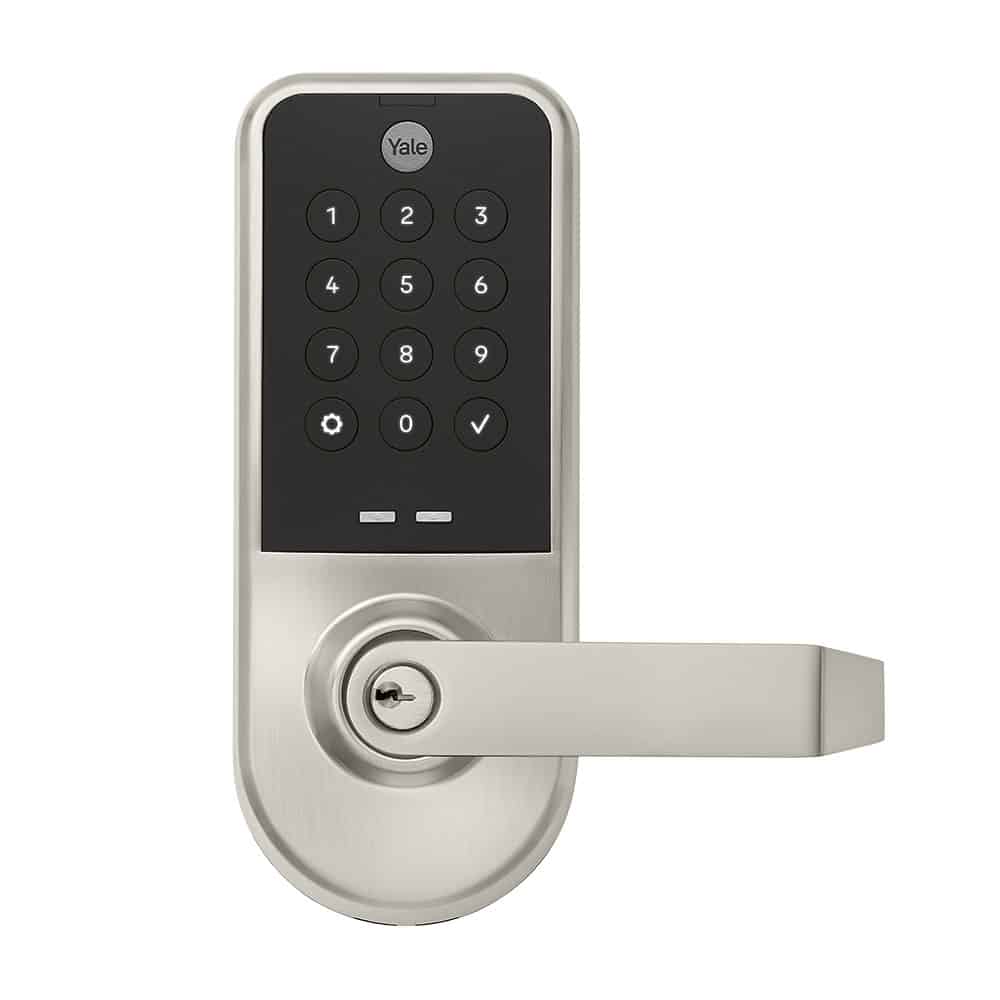
Product Recognition | |
|---|
Certification Number | ZC14-25120567 |
|---|
Name | Yale Pro® 2 Cylindrical Lock with Z-Wave |
|---|
Short Description | Yale Pro 2 Cylindrical Lock is a smart all-in-one keypad with a lever, perfect for entrances with a single door hole prep, like gyms or mailrooms. Residents and guests enjoy convenient keyless entry, while property owners gain
peace of mind knowing their shared spaces are safe and secure. |
|---|
Long Description | The Yale Pro® 2 Line of smart keypad locks delivers the industry’s most flexible solution for apartment and multi-family units including gyms and shared spaces. Built on the award-winning residential Yale Assure Lock® 2 design, it pairs modern aesthetics with years of reliable convenience and security. From interconnected to mortise, each lock in the suite is designed to meet diverse hardware and security requirements. For flexible connectivity, the locks integrate across multiple smart security systems and platforms, allowing providers to be swapped in or out as property needs evolve. And by eliminating physical keys, the Pro 2 line creates a truly unified, fully integrated access experience for property managers, residents, and guests alike. |
|---|
Brand | Yale |
|---|
Brand Owner | Fortune Brands Innovations, Inc. |
|---|
Product Identifier | YMB614-ZW4 |
|---|
Product Line | Yale Pro® 2 |
|---|
OEM Version | HW: 01 FW: 05.01:15.18 |
|---|
Hardware Platform | ZGM230SB |
|---|
Z-Wave Version | 7.23.2 |
|---|
Library Type | END_NODE_ENHANCED_232 |
|---|
Device Type | Lock DT |
|---|
Role Type | ROLE_TYPE_END_NODE_SLEEPING_LISTENING |
|---|
Manufacturer ID | 0x0463 |
|---|
Product Type ID | 0x8122 |
|---|
Product ID | 0x8B36 |
|---|
User Icon | 0x0300 |
|---|
Installer Icon | 0x0300 |
|---|
Radio Range Z-Wave (m) | 40 |
|---|
Radio Range Z-Wave LR (m) | 400 |
|---|
Frequency Plans | US: 916.00MHz, 908.40MHz, US_LR: 912.00MHz, 920.00MHz |
|---|
Categories | Locks |
|---|
Countries / Regions | Canada, United States of America |
|---|
Supported Command Classes | Identifier | Name | Key | Version |
|---|
COMMAND_CLASS_ASSOCIATION_V2 | Association V2 | 0x85 | 2 | COMMAND_CLASS_ASSOCIATION_GRP_INFO_V3 | Association Group Information (AGI) V3 | 0x59 | 3 | COMMAND_CLASS_DEVICE_RESET_LOCALLY | Device Reset Locally | 0x5A | 1 | COMMAND_CLASS_FIRMWARE_UPDATE_MD_V5 | Firmware Update Meta Data V5 | 0x7A | 5 | COMMAND_CLASS_INDICATOR_V3 | Indicator V3 | 0x87 | 3 | COMMAND_CLASS_MANUFACTURER_SPECIFIC_V2 | Manufacturer Specific V2 | 0x72 | 2 | COMMAND_CLASS_MULTI_CHANNEL_ASSOCIATION_V3 | Multi Channel Association V3 | 0x8E | 3 | COMMAND_CLASS_VERSION_V3 | Version V3 | 0x86 | 3 | COMMAND_CLASS_ZWAVEPLUS_INFO_V2 | Z-Wave Plus Info V2 | 0x5E | 2 | COMMAND_CLASS_SECURITY_2 | Security 2 | 0x9F | 1 | COMMAND_CLASS_SUPERVISION | Supervision | 0x6C | 1 | COMMAND_CLASS_TRANSPORT_SERVICE_V2 | Transport Service V2 | 0x55 | 2 | COMMAND_CLASS_POWERLEVEL | Powerlevel | 0x73 | 1 | COMMAND_CLASS_DOOR_LOCK_V4 | Door Lock V4 | 0x62 | 4 | COMMAND_CLASS_BASIC_V2 | Basic V2 | 0x20 | 2 | COMMAND_CLASS_SECURITY | Security 0 | 0x98 | 1 | COMMAND_CLASS_BATTERY | Battery | 0x80 | 1 | COMMAND_CLASS_USER_CODE_V2 | User Code V2 | 0x63 | 2 | COMMAND_CLASS_APPLICATION_STATUS | Application Status | 0x22 | 1 | COMMAND_CLASS_CONFIGURATION_V4 | Configuration V4 | 0x70 | 4 | COMMAND_CLASS_DOOR_LOCK_LOGGING | Door Lock Logging | 0x4C | 1 | COMMAND_CLASS_NOTIFICATION_V8 | Notification V8 | 0x71 | 8 | COMMAND_CLASS_SCHEDULE_ENTRY_LOCK_V3 | Schedule Entry Lock V3 | 0x4E | 3 | COMMAND_CLASS_USER_CREDENTIAL | User Credential | 0x83 | 1 | COMMAND_CLASS_TIME_V2 | Time V2 | 0x8A | 2 | COMMAND_CLASS_TIME_PARAMETERS | Time Parameters | 0x8B | 1 |
|
|---|
S2 Classes | S2_ACCESS_CONTROL |
|---|
Documents | Category | File |
|---|
Manual_English | | Adv_Manual | | Installer_Guide | |
|
|---|
Features | Feature | Values |
|---|
Door Lock Type | |
|
|---|
Association Groups | Group Number | Maximum Nodes Supported | End Point ID | Group Name | Profile |
|---|
1 | 5 | 0 | Lifeline | 0x0001 |
|
|---|
Configuration Parameters | Parameter Number | Name | Description | Format | Size | Min Value | Max Value | Default Value |
|---|
1 | Volume | Set Volume Level to high (1), low (2), or silent (3). | 1 | 1 | 0 | 0 | 0x01 | 2 | Auto Relock | Set Auto Relock feature to enable or disable. | 1 | 1 | 0 | 0 | 0x00 | 3 | Relock time | Adjust the time your lock will auto relock. | 1 | 1 | 0 | 0 | 0x03 | 4 | Wrong Code Entry Limit | Adjust the limit for wrong code entries allowed by your lock. | 1 | 1 | 0 | 0 | 0x03 | 7 | Shut down time | Adjust the time your lock is shutdown after reaching its wrong code entry limit. | 1 | 1 | 0 | 0 | 0x3C | 8 | Operating mode | Set the Operating Mode to normal mode, keypad disable mode, privacy mode or passage mode. | 1 | 1 | 0 | 0 | 0x00 | 11 | One Touch Locking | Set One Touch Locking feature to enable or disable. | 1 | 1 | 0 | 0 | 0xFF |
|
|---|
Texts | ID | Description | Value |
|---|
8 | Where to find S2 DSK on product | 1. Install the Yale Smart Module into the slot above the battery compartment
IMPORTANT: The batteries must be removed before removing the Yale Smart Module:
• Remove battery cover
• Remove batteries
• Insert or remove Yale Smart Module
• Reinstall batteries
• Reinstall battery cover
2. Open the Z-Wave system's smart home or alarm app on your smartphone or tablet
3. Follow the in-app instructions for adding a new device
4. On your lock keypad, enter your master entry code followed by the gear icon
5. Press the 7 key followed by the gear icon
6. Press the 1 key followed by the gear icon | 1 | Classic Inclusion | • Enter the 4–8-digit Programming PIN code followed by the gear key.
• Press the 7 key followed by the gear key.
• Press the 1 key followed by the gear key.
• Scan the QR code, if prompted, or…
• Enter the first five (5) digits of the DSK if prompted. | 2 | Classic Exclusion | • Enter the 4–8-digit Programming PIN code followed by the gear key.
• Press the 7 key followed by the gear key.
• Press the 3 key followed by the gear key. | 5 | Factory Reset Procedure | 1. Insert the reset pin into the designated hole on the interior handle to remove it.
2. Insert the reset pin into the designated hole above the interior lock to remove the battery cover. Remove one battery.
3. Untighten the screws to remove the interior lock from your door.
4. Insert reset pin into the designated reset hole on the back of the interior lock.
5. Press and hold the reset pin.
6. While holding the reset pin, reinsert battery.
7. Keep holding the reset pin for 5 more seconds.
8. After the keypad numbers light up sequentially from 1, take out the reset pin. |
|
|---|
Supported Notification Types | Notification Type | Event / State |
|---|
Access Control | Manual lock operation | Access Control | Manual unlock operation | Access Control | RF lock operation | Access Control | RF unlock operation | Access Control | Keypad lock operation | Access Control | Keypad unlock operation | Access Control | Auto lock locked operation | Access Control | Lock state: Lock jammed | Access Control | All user codes deleted | Access Control | Single user code deleted | Access Control | New user code added | Access Control | New user code not added due to duplicate code | Access Control | Keypad state: Keypad temporary disabled | Access Control | New program code entered : unique code for lock configuration | Access Control | Door state: Window/door is open | Access Control | Door state: Window/door is closed | Access Control | Messaging User Code entered via keypad | Access Control | Lock operation with User Code | Access Control | Unlock operation with User Code | Access Control | Credential lock/close operation | Access Control | Credential unlock/open operation | Access Control | Valid credential access denied due to User Active State being set to Occupied Disabled | Access Control | Non-Access credential entered via local interface | Access Control | Valid credential access denied due to the User's schedule being inactive | Access Control | Invalid credential used to access the node | Power Management | Power status: Power has been applied | Power Management | Battery maintenance status: Replace battery soon | Power Management | Battery maintenance status: Replace battery now | Power Management | Battery level status: Battery is fully charged | System | Cover status: Tampering, product cover removed |
|
|---|
Supports NWI | Yes |
|---|
Supports Explorer Frames | Yes |
|---|
Is Flirs | Yes |
|---|
Supports SmartStart | Yes |
|---|