| Product Recognition | |
|---|
| Certification Number | ZC12-20040054 |
|---|
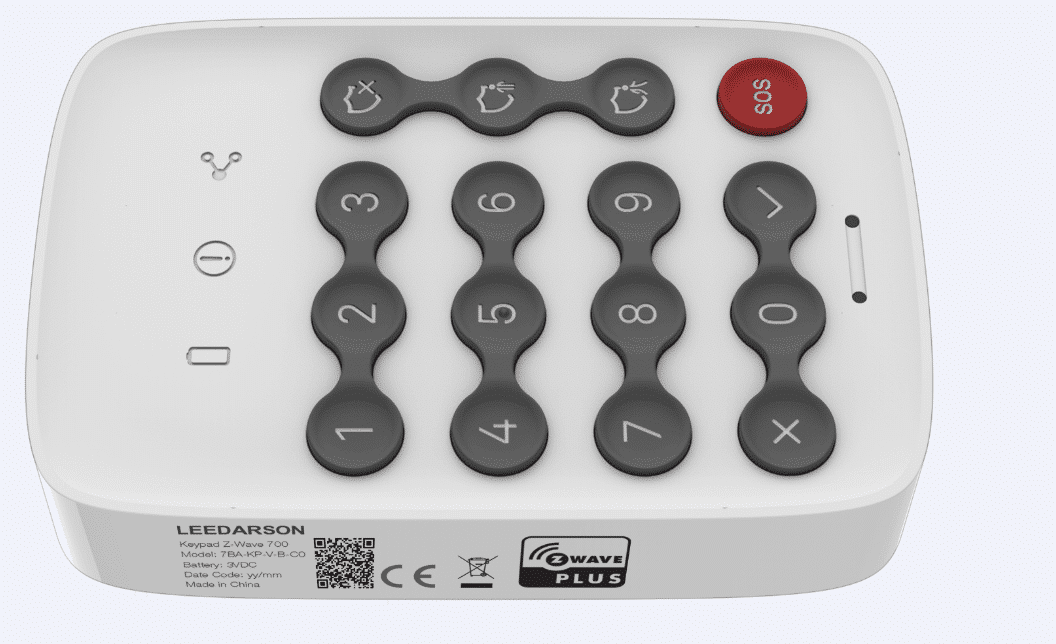
| Name | Z-WAVE 700 Keypad |
|---|
| Short Description | Security Keypad Z-Wave 700 |
|---|
| Long Description | The keypad provides a convenient user interface to arm or disarm the security system with a PIN code. |
|---|
| Brand | LEEDARSON |
|---|
| Product Identifier | 7BA-KP-V-B-C0 |
|---|
| Product Line | Security |
|---|
| OEM Version | HW: 1 FW: 1.01 |
|---|
| Hardware Platform | ZGM130 |
|---|
| Z-Wave Version | 7.12.2 |
|---|
| Library Type | SLAVE_ENHANCED_232 |
|---|
| Device Type | Entry Control Keypad Device |
|---|
| Role Type | ROLE_TYPE_SLAVE_SLEEPING_LISTENING |
|---|
| Manufacturer ID | 0x0300 |
|---|
| Product Type ID | 0x0300 |
|---|
| Product ID | 0x0044 |
|---|
| User Icon | 0x2001 |
|---|
| Installer Icon | 0x2001 |
|---|
| Frequency Plans | EU: 869.85MHz, 868.40MHz |
|---|
| Categories | Security Add-Ons |
|---|
| Countries / Regions | European Union |
|---|
| Supported Command Classes | | Identifier | Name | Key | Version |
|---|
| COMMAND_CLASS_ENTRY_CONTROL | Entry Control | 0x6F | 1 | | COMMAND_CLASS_CONFIGURATION_V4 | Configuration V4 | 0x70 | 4 | | COMMAND_CLASS_POWERLEVEL | Powerlevel | 0x73 | 1 | | COMMAND_CLASS_MULTI_CHANNEL_ASSOCIATION_V3 | Multi-Channel Association V3 | 0x8E | 3 | | COMMAND_CLASS_INDICATOR_V3 | Indicator V3 | 0x87 | 3 | | COMMAND_CLASS_BATTERY | Battery | 0x80 | 1 | | COMMAND_CLASS_SECURITY | Security S0 | 0x98 | 1 | | COMMAND_CLASS_TRANSPORT_SERVICE_V2 | Transport Service V2 | 0x55 | 2 | | COMMAND_CLASS_VERSION_V2 | Version V2 | 0x86 | 2 | | COMMAND_CLASS_DEVICE_RESET_LOCALLY | Device Reset Locally | 0x5A | 1 | | COMMAND_CLASS_ZWAVEPLUS_INFO_V2 | Z-Wave Plus Info V2 | 0x5E | 2 | | COMMAND_CLASS_ASSOCIATION_V2 | Association V2 | 0x85 | 2 | | COMMAND_CLASS_FIRMWARE_UPDATE_MD_V5 | Firmware Update Meta-Data V5 | 0x7A | 5 | | COMMAND_CLASS_ASSOCIATION_GRP_INFO_V3 | Association Group Information V3 | 0x59 | 3 | | COMMAND_CLASS_NOTIFICATION_V8 | Notification V8 | 0x71 | 8 | | COMMAND_CLASS_SECURITY_2 | Security S2 | 0x9F | 1 | | COMMAND_CLASS_SUPERVISION | Supervision | 0x6C | 1 | | COMMAND_CLASS_MANUFACTURER_SPECIFIC_V2 | Manufacturer Specific V2 | 0x72 | 2 |
|
|---|
| S2 Classes | S2_ACCESS_CONTROL |
|---|
| Documents | |
|---|
| Association Groups | | Group Number | Maximum Nodes Supported | End Point ID | Group Name | Profile | Description |
|---|
| 1 | 5 | 0 | Lifeline | 0x0001 | 1. Notification Report.
Keypad will send Notification Report to the associated nodes when Tamper/PS is triggered.
2. Entry Control Notification.
Keypad will send Entry Control Notification to the associated nodes when the mode button is triggered.
3. Battery Report.
Keypad will send Battery Report when the battery level is low and the battery report’s value is 0xFF.
4. Device Reset Locally Notification.
|
|
|---|
| Configuration Parameters | | Parameter Number | Name | Description | Format | Size | Min Value | Max Value | Default Value | Parameter Values |
|---|
| 2 | LowBatteryPercent | 1 to 32 ASCII encoded characters. ASCII codes MUST be in the value range 0x00-0xF7. The string MUST be padded with the value 0xFF to fit 16 byte blocks when sent in a notification. | 2 | 1 | 5 | 50 | 10 | | From | To | Description |
|---|
| 5 | 50 | 1 to 32 ASCII encoded characters. ASCII codes MUST be in the value range 0x00-0xF7. The string MUST be padded with the value 0xFF to fit 16 byte blocks when sent in a notification. |
| | 5 | PS Sensitivity | The sensitivity of PS | 1 | 1 | 0 | 1 | 0 | | From | To | Description |
|---|
| 0 | 1 | The sensitivity of PS |
| | 6 | L-Sensor Switch | Turn on/off Light Sensor Turn on: 1 Turn off: 0 | 1 | 1 | 0 | 1 | 1 | | From | To | Description |
|---|
| 0 | 1 | Turn on/off Light Sensor Turn on: 1 Turn off: 0 |
| | 7 | Day/Night threshold | The illuminance threshold to distinguish day and night | 2 | 1 | 0 | 255 | 50 | | From | To | Description |
|---|
| 0 | 255 | The illuminance threshold to distinguish day and night(unit: lumen) Eg: 50 -> Will turn key backlight if current illuminance is less than 50 lux, or close the key backlight. |
| | 8 | KeyBeep Switch | Turn on/off key tone Turn on: 1 Turn off: 0 | 1 | 1 | 0 | 1 | 1 | | From | To | Description |
|---|
| 0 | 1 | Turn on/off key tone Turn on: 1 Turn off: 0 |
| | 9 | ArmStatusIndicate Switch | Turn on/off arm status indicate after wake up Turn on: 1 Turn off: 0 | 1 | 1 | 0 | 1 | 1 | | From | To | Description |
|---|
| 0 | 1 | Turn on/off arm status indicate after wake up Turn on: 1 Turn off: 0 |
| | 3 | PS Switch | Turn on/off Proximity Sensor. Turn on: 1 Turn off: 0 | 1 | 1 | 0 | 1 | 1 | | From | To | Description |
|---|
| 0 | 1 | Turn on/off Proximity Sensor. Turn on: 1 Turn off: 0 |
|
|
|---|
| Texts | | ID | Description | Value |
|---|
| 2 | Classic Exclusion | Remove the Keypad from a Z-Wave network:
1. Set the Z-Wave network main controller into removing mode (see Z-Wave controller operating manual).
2. Trigger this button action. the Network LED will flashing at every 1 second.
3. If the removing is successful, the LED will solid green for 3 seconds. If the removing is failed then LED display yellow for 3 seconds, otherwise you need to repeat the process from step 2.
Note: Keypad will start SmartStart Inclusion when it is removed from a Z-wave network. | | 8 | Where to find S2 DSK on product | on the side of the product | | 1 | Classic Inclusion | Add the Keypad into the Z-Wave network:
1. Set the Z-Wave network main controller into learning mode (see Z-Wave network controller operating manual).
2. Trigger this action.
3. Network green LED will flashing at every 1 second to indicate that the inclusion is working, and solid green LED 3 seconds for indicate the inclusion is successful, otherwise the LED will be soild yellow in which you need to repeat the process from step 2. The timeout is 20~40s. | | 17 | Dynamic Capabilities | NA | | 4 | Wake-Up Procedure | Turn on/off arm status indicate after wake up | | 5 | Factory Reset Procedure | Keypad will reset itself to factory default by sending “Device Reset Locally CC” when it is included into a non-security Z-wave network.
DSK QR code is on the left side of the product with laser printing. User should follow the procedure in the section below if the controller does not support SmartStart inclusion. |
|
|---|
| Supported Notification Types | | Notification Type | Event / State |
|---|
| Home Security | (Refer to parameters): State idle | | Home Security | Cover status: Tampering, product cover removed | | Home Security | Motion sensor status: Motion detection |
|
|---|
| Supports NWI | Yes |
|---|
| Supports Explorer Frames | Yes |
|---|
| Is Flirs | Yes |
|---|
| Supports SmartStart | Yes |
|---|