Product Recognition | |
|---|
Certification Number | ZC10-16125332 |
|---|
Name | Z-Wave CO Detector |
|---|
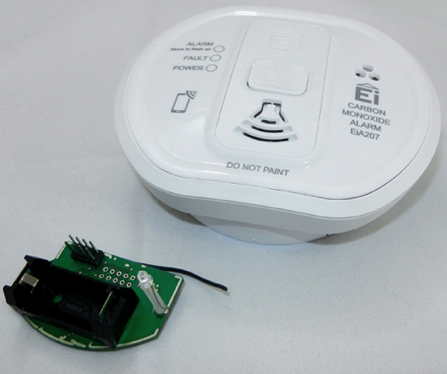
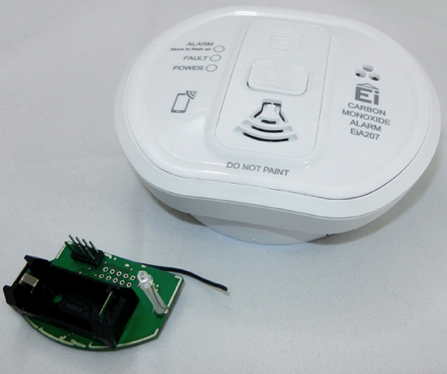
Short Description | This product combines a certified stand-alone Carbon Monoxide alarm with a plug-in Z-Wave module to form a wirelessly reporting Carbon Monoxide alarm. The Carbon Monoxide alarm is tested and certified by BSI to EN5029:2010. |
|---|
Long Description | The High-End Electro-Chemical Carbon Monoxide alarm head offers a 10 year sensor life and is powered via a 3V lithium battery that powers the Alarm head for the life of the alarm. The CO Sensor is monitored electronically and will report the following:
1. Alarm on Sensing Carbon Monoxide
2. Battery status reporting
3. Sensor Fault
4. Alarm removal from mounting plate
5. End of life to make sure it is replaced on time.
The device is a secure Z-Wave Plus device and can be used in one wireless Z-Wave network with other certified devices regardless of origin and brand. |
|---|
Brand | Popp |
|---|
Product Identifier | POPE004407 |
|---|
OEM Version | HW: 1 FW: 1.00 |
|---|
Hardware Platform | ZM5202 |
|---|
Z-Wave Version | 6.51.06 |
|---|
Library Type | SLAVE_ENHANCED |
|---|
Device Type | Notification Sensor |
|---|
Role Type | ROLE_TYPE_SLAVE_SLEEPING_REPORTING |
|---|
Manufacturer ID | 0x0154 |
|---|
Product Type ID | 0x0004 |
|---|
Product ID | 0x0003 |
|---|
User Icon | 0x0C02 |
|---|
Installer Icon | 0x0C02 |
|---|
Frequency Plans | EU: 869.85MHz, 868.40MHz |
|---|
Categories | Sensors |
|---|
Countries / Regions | European Union |
|---|
Supported Command Classes | Identifier | Name | Key | Version |
|---|
COMMAND_CLASS_SENSOR_MULTILEVEL_V5 | Sensor Multilevel V5 | 0x31 | 5 | COMMAND_CLASS_POWERLEVEL | Powerlevel | 0x73 | 1 | COMMAND_CLASS_BATTERY | Battery | 0x80 | 1 | COMMAND_CLASS_BASIC | Basic | 0x20 | 1 | COMMAND_CLASS_CONFIGURATION | Configuration | 0x70 | 1 | COMMAND_CLASS_SECURITY | Security S0 | 0x98 | 1 | COMMAND_CLASS_SENSOR_BINARY_V2 | Sensor Binary V2 | 0x30 | 2 | COMMAND_CLASS_VERSION_V2 | Version V2 | 0x86 | 2 | COMMAND_CLASS_WAKE_UP_V2 | Wake Up V2 | 0x84 | 2 | COMMAND_CLASS_DEVICE_RESET_LOCALLY | Device Reset Locally | 0x5A | 1 | COMMAND_CLASS_ZWAVEPLUS_INFO_V2 | Z-Wave Plus Info V2 | 0x5E | 2 | COMMAND_CLASS_ASSOCIATION_V2 | Association V2 | 0x85 | 2 | COMMAND_CLASS_ASSOCIATION_GRP_INFO | Association Group Info | 0x59 | 1 | COMMAND_CLASS_NOTIFICATION_V5 | Notification V5 | 0x71 | 5 | COMMAND_CLASS_FIRMWARE_UPDATE_MD_V3 | Firmware Update Meta-Data V3 | 0x7A | 3 | COMMAND_CLASS_MANUFACTURER_SPECIFIC_V2 | Manufacturer Specific V2 | 0x72 | 2 |
|
|---|
Controlled Command Classes | Identifier | Name | Key | Version |
|---|
COMMAND_CLASS_SECURITY | Security S0 | 0x98 | 1 | COMMAND_CLASS_BASIC | Basic | 0x20 | 1 |
|
|---|
Documents | Category | Description | File |
|---|
Manual_Primary_Lang | Product or Owner's Manual | |
|
|---|
Features | Feature | Values |
|---|
Battery Quantity | | Color | | Battery Type | |
|
|---|
Association Groups | Group Number | Maximum Nodes Supported | End Point ID | Description |
|---|
1 | 10 | 0 | Z-Wave Plus Lifeline | 2 | 10 | 0 | Switching Command when Alarm |
|
|---|
Configuration Parameters | Parameter Number | Name | Format | Size | Min Value | Max Value | Default Value | Parameter Values |
|---|
1 | Value of On-Command | 0 | 1 | 0 | 0 | 99 | From | To | Description |
|---|
0 | 99 | Basic Command Value |
| 2 | Value of Off-Command | 0 | 1 | 0 | 0 | 0 | From | To | Description |
|---|
0 | 99 | Basic Command Value |
|
|
|---|
Texts | ID | Description | Value |
|---|
1 | Inclusion | Pressing the button 'Inclusion Button' for one second will include the device. If the button is pressed for at least 2 seconds the inclusion will be done without the Security Command Class. | 2 | Exclusion | A single click on the button will exclude the device. | 5 | Factory Reset | To do a factory reset press the button on the bottom of the device for at least 10 seconds. This procedure should only be used when the primary controller is inoperable. | 4 | Device Wake-Up | A single click on the button will wakeup the device. |
|
|---|
Supports NWI | Yes |
|---|
Supports Explorer Frames | Yes |
|---|
Radio Range Z-Wave (m) | 40 |
|---|