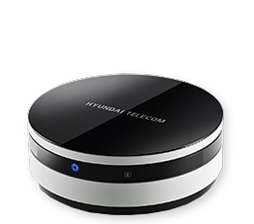
Product Recognition | |
|---|
Certification Number | ZC10-18116300 |
|---|
Name | Z-Wave Gateway Controller and hub |
|---|
Short Description | Z-Wave gateways and controllers serve as the center of your smart home automation system. |
|---|
Long Description | Z-Wave gateways and controllers serve as the center of your smart home automation system.
These devices communicate with your Z-Wave devices and accessories allowing you to control your home remotely via your phone, computer or other mobile device. |
|---|
Brand | IMAZU |
|---|
Product Identifier | HCS-W1001 |
|---|
OEM Version | HW: 1 FW: 5.50:02.61:01.00:01.00 |
|---|
Hardware Platform | ZM5304 |
|---|
Z-Wave Version | 6.71.03 |
|---|
Library Type | CONTROLLER_BRIDGE |
|---|
Device Type | Gateway |
|---|
Role Type | ROLE_TYPE_CONTROLLER_CENTRAL_STATIC |
|---|
Manufacturer ID | 0x0374 |
|---|
Product Type ID | 0x0001 |
|---|
Product ID | 0x0001 |
|---|
User Icon | 0x0500 |
|---|
Installer Icon | 0x0500 |
|---|
Frequency Plans | EU: 869.85MHz, 868.40MHz |
|---|
Categories | All Controllers, Gateway Controller |
|---|
Countries / Regions | European Union |
|---|
Supported Command Classes | Identifier | Name | Key | Version |
|---|
COMMAND_CLASS_POWERLEVEL | Powerlevel | 0x73 | 1 | COMMAND_CLASS_INCLUSION_CONTROLLER | Inclusion Controller | 0x74 | 1 | COMMAND_CLASS_APPLICATION_STATUS | Application Status | 0x22 | 1 | COMMAND_CLASS_CRC_16_ENCAP | CRC16 Encapsulation | 0x56 | 1 | COMMAND_CLASS_SECURITY | Security S0 | 0x98 | 1 | COMMAND_CLASS_TRANSPORT_SERVICE_V2 | Transport Service V2 | 0x55 | 2 | COMMAND_CLASS_VERSION_V2 | Version V2 | 0x86 | 2 | COMMAND_CLASS_DEVICE_RESET_LOCALLY | Device Reset Locally | 0x5A | 1 | COMMAND_CLASS_ZWAVEPLUS_INFO_V2 | Z-Wave Plus Info V2 | 0x5E | 2 | COMMAND_CLASS_ASSOCIATION_V2 | Association V2 | 0x85 | 2 | COMMAND_CLASS_ASSOCIATION_GRP_INFO_V3 | Association Group Information V3 | 0x59 | 3 | COMMAND_CLASS_SECURITY_2 | Security S2 | 0x9F | 1 | COMMAND_CLASS_SUPERVISION | Supervision | 0x6C | 1 | COMMAND_CLASS_MANUFACTURER_SPECIFIC_V2 | Manufacturer Specific V2 | 0x72 | 2 | COMMAND_CLASS_MULTI_CMD | Multi-Command | 0x8F | 1 |
|
|---|
Controlled Command Classes | Identifier | Name | Key | Version |
|---|
COMMAND_CLASS_SWITCH_MULTILEVEL | Switch Multilevel | 0x26 | 1 | COMMAND_CLASS_SENSOR_MULTILEVEL_V5 | Sensor Multilevel V5 | 0x31 | 5 | COMMAND_CLASS_DOOR_LOCK | Door Lock | 0x62 | 1 | COMMAND_CLASS_MULTI_CHANNEL_ASSOCIATION_V3 | Multi-Channel Association V3 | 0x8E | 3 | COMMAND_CLASS_BATTERY | Battery | 0x80 | 1 | COMMAND_CLASS_THERMOSTAT_MODE | Thermostat Mode | 0x40 | 1 | COMMAND_CLASS_SWITCH_BINARY | Switch Binary | 0x25 | 1 | COMMAND_CLASS_CRC_16_ENCAP | CRC16 Encapsulation | 0x56 | 1 | COMMAND_CLASS_SECURITY | Security S0 | 0x98 | 1 | COMMAND_CLASS_WAKE_UP_V2 | Wake Up V2 | 0x84 | 2 | COMMAND_CLASS_ASSOCIATION_V2 | Association V2 | 0x85 | 2 | COMMAND_CLASS_MULTI_CHANNEL_V4 | Multi-Channel V4 | 0x60 | 4 | COMMAND_CLASS_THERMOSTAT_SETPOINT | Thermostat Setpoint | 0x43 | 1 | COMMAND_CLASS_METER | Meter | 0x32 | 1 | COMMAND_CLASS_BASIC_V2 | Basic V2 | 0x20 | 2 | COMMAND_CLASS_SECURITY_2 | Security S2 | 0x9F | 1 | COMMAND_CLASS_NOTIFICATION_V4 | Notification V4 | 0x71 | 4 |
|
|---|
S2 Classes | S2_UNAUTHENTICATED, S2_AUTHENTICATED, S2_ACCESS_CONTROL |
|---|
Documents | Category | Description | File |
|---|
Manual_Primary_Lang | Product or Owner's Manual | |
|
|---|
Features | Feature | Values |
|---|
Supported Notification Types | | Outdoor Use | | Communications Connections | Value |
|---|
Ethernet (Wireless/WiFi) |
| Controller Supports Multiple Networks | | Firmware Updatable | Value |
|---|
Updatable by Consumer via Internet |
| IP (Ingress Protection) Rated | | Sensors | | Color | | Communications Protocol | |
|
|---|
Association Groups | Group Number | Maximum Nodes Supported | End Point ID | Description |
|---|
1 | 5 | 0 | Z-Wave Plus Lifeline |
|
|---|
Texts | ID | Description | Value |
|---|
3 | Learn Mode (adding another controller) | This performs the Z-Wave set learn mode network operation. This can only be performed when Z-Ware is not in a network and will typically make Z-Ware an inclusion or Secondary Controller, in which chase, some of its facilities will not be available.
To complete an S2 inclusion, the DSK may need to be entered on the including Controller.
Note that this function may let ht-host as “secondary controller” or “inclusion controller” in another existing network, just start inclusion mode or controller shift on another controller, then start ht-host learn mode, after inclusion, ht-host will replicate node information from another controller.
Since our design is based on “primary controller”, we recommend that you just use our ht-host as “primary controller” | 23 | Controller Inclusion | press iot add device button by plus icon will let into inclusion mode, about 100seconds
User can now trigger the device’s node information frame to add to the hcs-w1001 Z-Wave network.
With Z-Wave security2, user needs to accept or modify the security class setting. It is recommended that the user not change the security class settings.
Additionally for security2 class 1 and 2 devices, the user needs to key in the 1st 5digits of the DSK. | 24 | Controller Exclusion | Pressing the “MODIFY IOT DEVICE” will let into exclusion mode, about 100seconds.
User can now trigger the device’s node information frame to remove device from any Z-Wave network. | 5 | Factory Reset | This is the Z-Wave Set default network operation and it pops up a confirmation prompt.
If this controller is the primary controller for your network, resetting it will result in the nodes in your network being orphaned and it will be necessary after the reset to exclude and re-include all of the nodes in the network.
If this controller is being used as a secondary controller in the network, use this procedure to reset this controller only in the event that the network primary controller is missing or otherwise inoperable. |
|
|---|
Supports NWI | Yes |
|---|
Supports Explorer Frames | Yes |
|---|
Radio Range Z-Wave (m) | 40 |
|---|