Product Recognition | |
|---|
Certification Number | ZC10-19086729 |
|---|
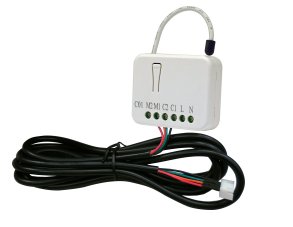
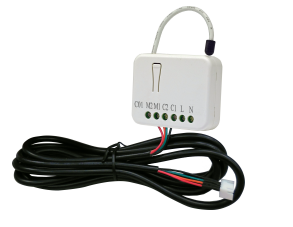
Name | Z-Wave JEM-A Adapter |
|---|
Short Description | PAC01 is a security enabled wireless JEM-A Adapter, based on Z-Wave Plus technology. |
|---|
Long Description | PAC01 is a security enabled wireless JEM-A Adapter, based on Z-Wave Plus technology. Z-Wave Plus TM enabled devices displaying the Z-Wave Plus TM logo can also be used with it regardless of the manufacturer, and can also be used in other manufac-
turer’s Z-Wave TM enabled networks. Z-Wave controller can On/Off the thermostat by sending Thermostat Setback command.
PAC01 is a transceiver which is a security enabled device which based on Z-Wave Plus technology, and it is fully compatible with any Z-Wave TM enabled network. Since PAC01 supports Security Command Class, it can learn with a Secured enabled controller to fully utilize the device. Its functionality and supported
command classes is identical when included as a secure and non-secure device. |
|---|
Brand | Philio Technology |
|---|
Product Identifier | PAC01-3 |
|---|
Product Line | Philio Z-Wave Products |
|---|
OEM Version | HW: 1 FW: 1.01 |
|---|
Hardware Platform | SD3502 |
|---|
Z-Wave Version | 6.81.03 |
|---|
Library Type | SLAVE_ENHANCED_232 |
|---|
Device Type | Thermostat - Setback |
|---|
Role Type | ROLE_TYPE_SLAVE_ALWAYS_ON |
|---|
Manufacturer ID | 0x013C |
|---|
Product Type ID | 0x000B |
|---|
Product ID | 0x0058 |
|---|
User Icon | 0x1202 |
|---|
Installer Icon | 0x1202 |
|---|
Frequency Plans | JP: 922.50MHz, 923.90MHz, 926.30MHz |
|---|
Categories | Thermostats |
|---|
Countries / Regions | Japan |
|---|
Supported Command Classes | Identifier | Name | Key | Version |
|---|
COMMAND_CLASS_FIRMWARE_UPDATE_MD_V4 | Firmware Update Meta-Data V4 | 0x7A | 4 | COMMAND_CLASS_POWERLEVEL | Powerlevel | 0x73 | 1 | COMMAND_CLASS_THERMOSTAT_SETBACK | Thermostat Setback | 0x47 | 1 | COMMAND_CLASS_BASIC | Basic | 0x20 | 1 | COMMAND_CLASS_SECURITY | Security S0 | 0x98 | 1 | COMMAND_CLASS_TRANSPORT_SERVICE_V2 | Transport Service V2 | 0x55 | 2 | COMMAND_CLASS_DEVICE_RESET_LOCALLY | Device Reset Locally | 0x5A | 1 | COMMAND_CLASS_ZWAVEPLUS_INFO_V2 | Z-Wave Plus Info V2 | 0x5E | 2 | COMMAND_CLASS_ASSOCIATION_V2 | Association V2 | 0x85 | 2 | COMMAND_CLASS_ASSOCIATION_GRP_INFO | Association Group Info | 0x59 | 1 | COMMAND_CLASS_SECURITY_2 | Security S2 | 0x9F | 1 | COMMAND_CLASS_VERSION_V3 | Version V3 | 0x86 | 3 | COMMAND_CLASS_SUPERVISION | Supervision | 0x6C | 1 | COMMAND_CLASS_MANUFACTURER_SPECIFIC_V2 | Manufacturer Specific V2 | 0x72 | 2 |
|
|---|
S2 Classes | S2_UNAUTHENTICATED |
|---|
Documents | Category | Description | File |
|---|
Manual_Primary_Lang | Product Manual | | Manual_English | Product Manual in English | |
|
|---|
Features | Feature | Values |
|---|
Firmware Updatable | |
|
|---|
Association Groups | Group Number | Maximum Nodes Supported | End Point ID | Group Name | Description |
|---|
1 | 5 | 0 | Lifeline | Group 1 command list COMMAND_CLASS_DEVICE_RESET_LOCALLY |
|
|---|
Texts | ID | Description | Value |
|---|
2 | Classic Exclusion | 1. Put your Z-Wave controller into exclusion mode by following the instructions provided by the
controller manufacturer.
2. Pressing Include button of PAC01 three times within 2 seconds will enter exclusion mode.
3. Node ID has been excluded. | 5 | Factory Reset Procedure | 1. Pressing Include button of PAC01 three times within 2 seconds will enter inclusion mode.
2. Within 1 second, press Include button of PAC01 again for 5 seconds.
3. IDs are excluded. | 8 | Where to find S2 DSK on product | The DSK can be found on on the back of your product. | 1 | Classic Inclusion | 1. Put your Z-Wave controller into inclusion mode by following the instructions provided by the
controller manufacturer.
2. Pressing Include button of PAC01 three times within 2 seconds will enter inclusion mode. |
|
|---|
Supports NWI | Yes |
|---|
Supports Explorer Frames | Yes |
|---|
Supports SmartStart | Yes |
|---|
Radio Range Z-Wave (m) | 40 |
|---|