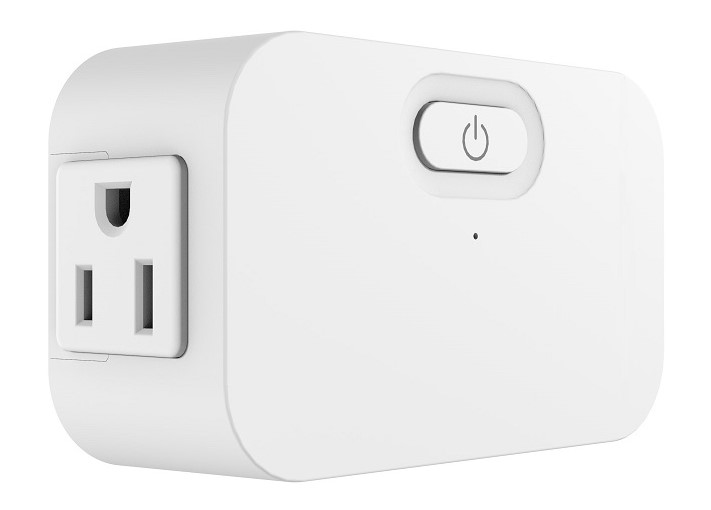
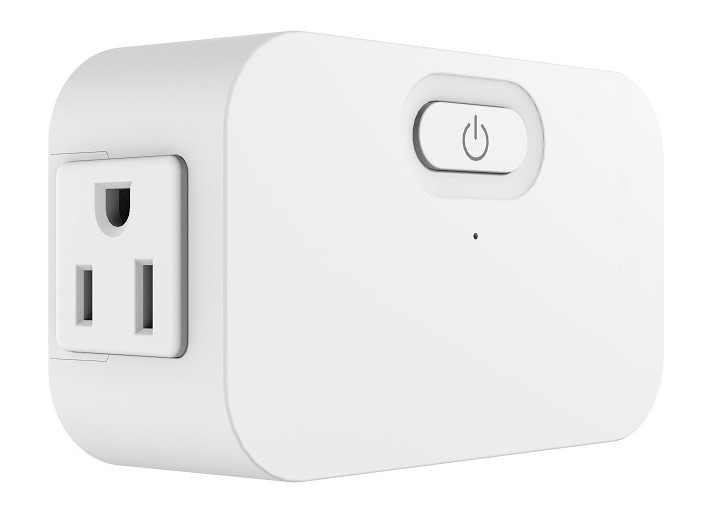
Product Recognition | |
|---|
Certification Number | ZC12-21050231 |
|---|
Name | Z-Wave Plus Plug-in |
|---|
Short Description | ZWAVE PLUG-IN OUTLET, ENERGY MONITORING, 15A |
|---|
Long Description | The Square D 15 Amp Z-Wave Plus Energy Monitoring Plug-In Duplex Receptacle is the professionals choice for secure reliable lighting control. Easily upgrade a standard receptacle to offer control, excellent for temporary applications like Christmas lighting. Perfect for monitoring energy usage of the device plugged into the controlled outlet. It works with any Z-Wave hub and can be grouped with up to 5 other Z-Wave Plus devices. |
|---|
Brand | Square D |
|---|
Product Identifier | SQR62102WHZ |
|---|
Product Line | Z-Wave Plus devices |
|---|
OEM Version | HW: 1 FW: 1.05 |
|---|
Hardware Platform | ZGM130 |
|---|
Z-Wave Version | 7.13.6 |
|---|
Library Type | SLAVE_ENHANCED_232 |
|---|
Device Type | Binary Switch |
|---|
Role Type | ROLE_TYPE_SLAVE_ALWAYS_ON |
|---|
Manufacturer ID | 0x0447 |
|---|
Product Type ID | 0x000E |
|---|
Product ID | 0x1108 |
|---|
User Icon | 0x0701 |
|---|
Installer Icon | 0x0701 |
|---|
Frequency Plans | US: 916.00MHz, 908.40MHz |
|---|
Categories | All Lighting Devices, On/Off Switches/Devices |
|---|
Countries / Regions | United States of America |
|---|
Supported Command Classes | Identifier | Name | Key | Version |
|---|
COMMAND_CLASS_CONFIGURATION_V4 | Configuration V4 | 0x70 | 4 | COMMAND_CLASS_SWITCH_BINARY_V2 | Switch Binary V2 | 0x25 | 2 | COMMAND_CLASS_POWERLEVEL | Powerlevel | 0x73 | 1 | COMMAND_CLASS_PROTECTION_V2 | Protection V2 | 0x75 | 2 | COMMAND_CLASS_MULTI_CHANNEL_ASSOCIATION_V3 | Multi-Channel Association V3 | 0x8E | 3 | COMMAND_CLASS_INDICATOR_V3 | Indicator V3 | 0x87 | 3 | COMMAND_CLASS_APPLICATION_STATUS | Application Status | 0x22 | 1 | COMMAND_CLASS_TRANSPORT_SERVICE_V2 | Transport Service V2 | 0x55 | 2 | COMMAND_CLASS_DEVICE_RESET_LOCALLY | Device Reset Locally | 0x5A | 1 | COMMAND_CLASS_ZWAVEPLUS_INFO_V2 | Z-Wave Plus Info V2 | 0x5E | 2 | COMMAND_CLASS_ASSOCIATION_V2 | Association V2 | 0x85 | 2 | COMMAND_CLASS_FIRMWARE_UPDATE_MD_V5 | Firmware Update Meta-Data V5 | 0x7A | 5 | COMMAND_CLASS_ASSOCIATION_GRP_INFO_V3 | Association Group Information V3 | 0x59 | 3 | COMMAND_CLASS_BASIC_V2 | Basic V2 | 0x20 | 2 | COMMAND_CLASS_SECURITY_2 | Security S2 | 0x9F | 1 | COMMAND_CLASS_METER_V5 | Meter V5 | 0x32 | 5 | COMMAND_CLASS_VERSION_V3 | Version V3 | 0x86 | 3 | COMMAND_CLASS_SUPERVISION | Supervision | 0x6C | 1 | COMMAND_CLASS_MANUFACTURER_SPECIFIC_V2 | Manufacturer Specific V2 | 0x72 | 2 |
|
|---|
S2 Classes | S2_UNAUTHENTICATED, S2_AUTHENTICATED |
|---|
Documents | Category | Description | File |
|---|
Manual_Primary_Lang | Product Manual | | Adv_Manual | Advanced Information Product Manual | |
|
|---|
Features | Feature | Values |
|---|
Z-Wave Scene Type | |
|
|---|
Association Groups | Group Number | Maximum Nodes Supported | End Point ID | Group Name | Profile | Description |
|---|
2 | 5 | 0 | On/Off Control | 0x2001 | Sends Basic Set to associated devices, when Short press the Program Button 2 times. | 1 | 5 | 0 | Lifeline | 0x0001 | Members of this group will receive unsolicited messages related to the status of the
Plug. |
|
|---|
Configuration Parameters | Parameter Number | Name | Description | Format | Size | Min Value | Max Value | Default Value | Parameter Values |
|---|
1 | LED indicator Status | Synchronization of load power and LED indicator. | 1 | 1 | 0 | 1 | 1 | From | To | Description |
|---|
1 | 1 | Power On, LED On;Power Off, LED Off | 0 | 0 | Power On, LED Off; Power Off, LED On |
| 2 | Delayed OFF Time | Delay off means when users press button to turn off the load, there’s a reaction time. | 2 | 1 | 0 | 240 | 0 | From | To | Description |
|---|
0 | 240 | Delay off means when users press button to turn off the load, there’s a reaction time. |
| 3 | Power On Status | | 2 | 1 | 0 | 3 | 1 | From | To | Description |
|---|
1 | 1 | Off | 2 | 2 | On | 3 | 3 | Last State |
| 4 | Child Lockout Enable | Child lockout feature can enabled and disabled local control. | 1 | 1 | 0 | 1 | 0 | From | To | Description |
|---|
0 | 0 | Disable | 1 | 1 | Enable |
|
|
|---|
Texts | ID | Description | Value |
|---|
2 | Classic Exclusion | Exclusion from a Z-Wave network (Figure 4): When the gateway is in removing mode (please refer to the instruction of the Z-Wave gateway for the operations on gateway itself). Press the program button 3 times within 1.5s (the interval between each press is less than 0.5s). | 5 | Factory Reset Procedure | Long press the reset button for >20 seconds till the blue LED blink 5 times within one second. | 8 | Where to find S2 DSK on product | The DSK can be found on the product and its packaging. | 1 | Classic Inclusion | A. SmartStart inclusion: The feature assumes the gateway has implemented SmartStart. Users could use the APP of the gateway or the gateway camera to scan the QR code (located on the device or on the enclosed label in the package) before powering on the device, and then when the device is powered on, it shall be automatically added to the gateway.
B. Manual inclusion (Figure 4): When the gateway is in adding mode (please refer to the instruction of the Z-Wave gateway for the operations on gateway itself). Press the program button 3 times within 1.5s (the interval between each press is less than 0.5s). |
|
|---|
Supported / Controlled Meter Types | Meter Type | Rate Type | Description |
|---|
Electric meter | Import | Electric Meter Consumption |
|
|---|
Supports NWI | Yes |
|---|
Supports Explorer Frames | Yes |
|---|
Supports SmartStart | Yes |
|---|
Radio Range Z-Wave (m) | 40 |
|---|