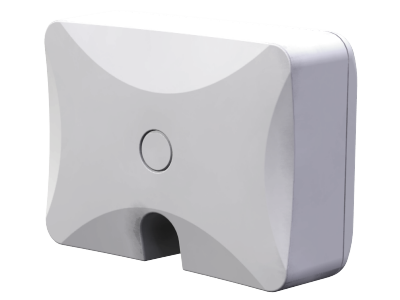
Product Recognition | |
|---|
Certification Number | ZC10-17075695 |
|---|
Name | Z-Wave Repeater |
|---|
Short Description | The ZRP-110 is a Z-Wave Repeater with Best RF Performance to replicate Z-Wave Signals in a network. |
|---|
Long Description | ZRP-110 is a Z-Wave repeater with best RF performance to replicate Z-Wave signals in a network. The repeater re-transmits an input Radio Frequency (RF) signal by routing the signal around obstacles and radio dead spots to ensure that the signal is received at its intended destinations.
ZRP-110 is a security enabled Z-Wave plus device. A security Enabled Z-Wave Plus Controller must be used in order to fully utilize the product. |
|---|
Brand | Remotec |
|---|
Product Identifier | ZRP-110US |
|---|
OEM Version | HW: 1 FW: 0.10 |
|---|
Hardware Platform | ZM5202 |
|---|
Z-Wave Version | 6.71.01 |
|---|
Library Type | SLAVE_ROUTING |
|---|
Device Type | Repeater |
|---|
Role Type | ROLE_TYPE_SLAVE_ALWAYS_ON |
|---|
Manufacturer ID | 0x5254 |
|---|
Product Type ID | 0x1000 |
|---|
Product ID | 0x8141 |
|---|
User Icon | 0x1B00 |
|---|
Installer Icon | 0x1B00 |
|---|
Frequency Plans | US: 916.00MHz, 908.40MHz |
|---|
Categories | Network Devices |
|---|
Countries / Regions | United States of America |
|---|
Supported Command Classes | Identifier | Name | Key | Version |
|---|
COMMAND_CLASS_POWERLEVEL | Powerlevel | 0x73 | 1 | COMMAND_CLASS_SECURITY | Security S0 | 0x98 | 1 | COMMAND_CLASS_TRANSPORT_SERVICE_V2 | Transport Service V2 | 0x55 | 2 | COMMAND_CLASS_VERSION_V2 | Version V2 | 0x86 | 2 | COMMAND_CLASS_DEVICE_RESET_LOCALLY | Device Reset Locally | 0x5A | 1 | COMMAND_CLASS_ZWAVEPLUS_INFO_V2 | Z-Wave Plus Info V2 | 0x5E | 2 | COMMAND_CLASS_ASSOCIATION_V2 | Association V2 | 0x85 | 2 | COMMAND_CLASS_SECURITY_2 | Security S2 | 0x9F | 1 | COMMAND_CLASS_SUPERVISION | Supervision | 0x6C | 1 | COMMAND_CLASS_MANUFACTURER_SPECIFIC_V2 | Manufacturer Specific V2 | 0x72 | 2 | COMMAND_CLASS_ASSOCIATION_GRP_INFO_V2 | Association Group Information V2 | 0x59 | 2 |
|
|---|
S2 Classes | S2_UNAUTHENTICATED |
|---|
Documents | Category | Description | File |
|---|
Manual_Primary_Lang | Product or Owner's Manual | |
|
|---|
Features | |
|---|
Association Groups | Group Number | Maximum Nodes Supported | End Point ID | Description |
|---|
1 | 1 | 0 | Z-Wave Plus Lifeline |
|
|---|
Texts | ID | Description | Value |
|---|
5 | Factory Reset | 1, Press and keep holding the PROG button for not less than 10 seconds. - LED state will toggle for first 5 seconds of being pressed.
LED state will toggle again after the remaining 5 seconds.
2, Release the PROG button then triple click the PROG button within 2 seconds of step 1.
- LED will stay in previous ON or OFF stage.
Remark: Please use this procedure only when the network primary controller is missing or otherwise inoperable. | 1 | Inclusion | 1, Refer to your primary controller instructions to process the inclusion / exclusion setup procedure.
2, When prompted by your primary controller, triple click the PROG button within 1 second.
3, The primary controller should indicate that the action was successful. If the controller indicates the action was unsuccessful, please repeat the procedure. | 2 | Exclusion | 1, Refer to your primary controller instructions to process the inclusion / exclusion setup procedure.
2, When prompted by your primary controller, triple click the PROG button within 1 second.
3, The primary controller should indicate that the action was successful. If the controller indicates the action was unsuccessful, please repeat the procedure. |
|
|---|
Supports NWI | Yes |
|---|
Supports Explorer Frames | Yes |
|---|