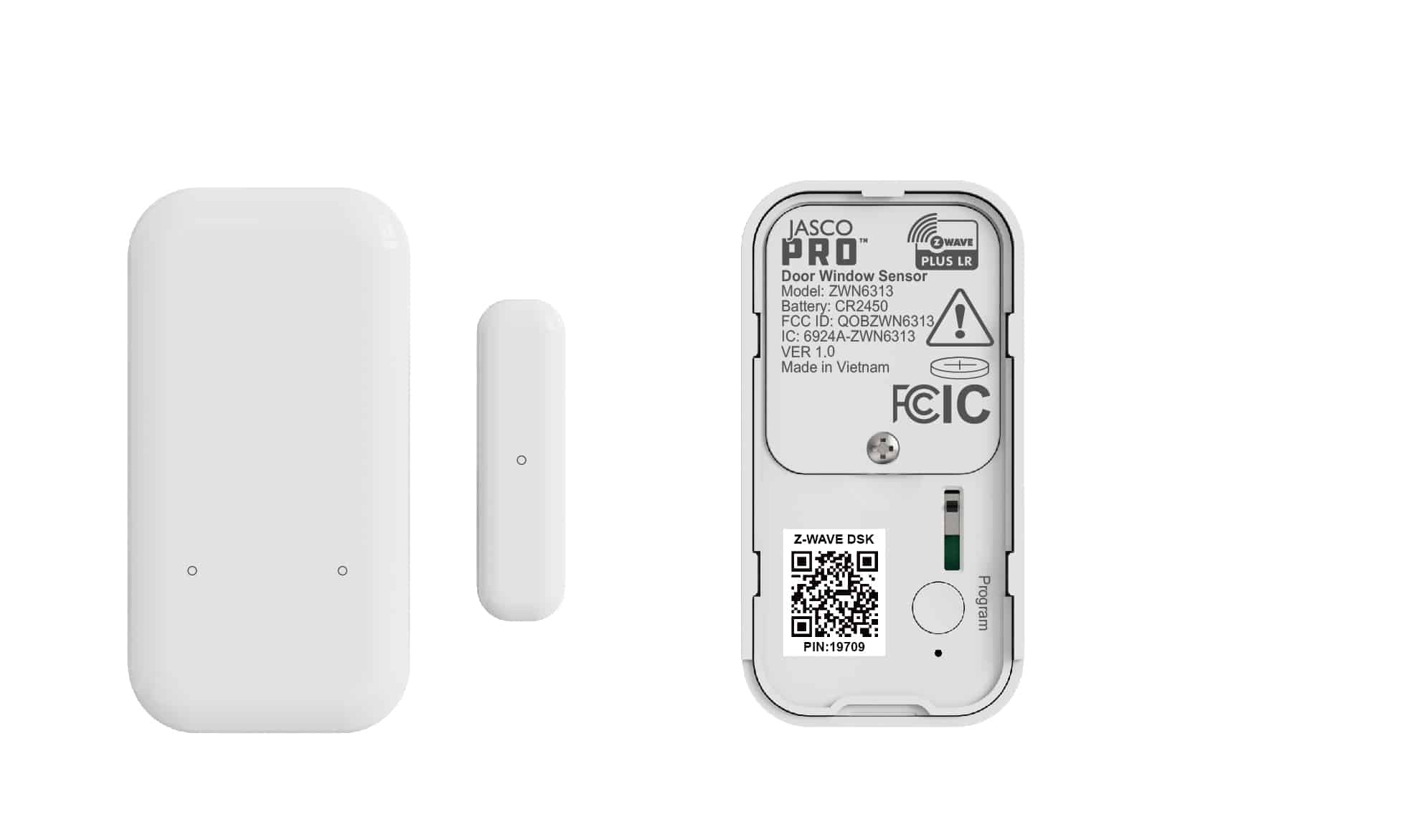
| Product Recognition | |
|---|
| Certification Number | ZC14-25110559 |
|---|
| Name | Z-Wave Slim Door/Window Sensor Open-Close |
|---|
| Short Description | Use the Slim Door/Window Sensor to monitor your doors, windows, and other important points of entry in your home. |
|---|
| Description | PRODUCT HIGHLIGHTS:
- Quick and reliable open/close alerts sent to your Z-Wave® hub
- NEW 800 series chip for faster communication and more battery life than ever
- Extra small for discreet mounting
- Waterproof case available for outdoor installs (sold separately)
- Z-Wave® Long Range for ultra reliable no-mesh communication
- S2 security and SmartStart
- Supports OTA firmware updates |
|---|
| Brand | JascoPro |
|---|
| Brand Owner | Jasco Products Company |
|---|
| Identifier | 84142 |
|---|
| Product Line | JascoPro Sensors |
|---|
| OEM Version | HW: 01 FW: 00.08 |
|---|
| Hardware Platform | EFR32ZG23A |
|---|
| Z-Wave Version | 7.24.1 |
|---|
| Library Type | END_NODE_ENHANCED_232 |
|---|
| Device Type | Notification Sensor DT |
|---|
| Role Type | ROLE_TYPE_END_NODE_SLEEPING_REPORTING |
|---|
| Manufacturer ID | 0x0063 |
|---|
| Product Type ID | 0x4953 |
|---|
| Product ID | 0x3438 |
|---|
| User Icon | 0x0C06 |
|---|
| Installer Icon | 0x0C06 |
|---|
| Radio Range Z-Wave (m) | 40 |
|---|
| Radio Range Z-Wave LR (m) | 400 |
|---|
| Frequency Plans | US: 916.00MHz, 908.40MHz, US_LR: 912.00MHz, 920.00MHz |
|---|
| Categories | Sensors |
|---|
| Countries / Regions | Canada, Mexico, United States of America |
|---|
| Supported Command Classes | | Identifier | Name | Key | Version |
|---|
| COMMAND_CLASS_CONFIGURATION_V4 | Configuration V4 | 0x70 | 4 | | COMMAND_CLASS_NOTIFICATION_V8 | Notification V8 | 0x71 | 8 | | COMMAND_CLASS_ASSOCIATION_V2 | Association V2 | 0x85 | 2 | | COMMAND_CLASS_ASSOCIATION_GRP_INFO_V3 | Association Group Information (AGI) V3 | 0x59 | 3 | | COMMAND_CLASS_BATTERY | Battery | 0x80 | 1 | | COMMAND_CLASS_DEVICE_RESET_LOCALLY | Device Reset Locally | 0x5A | 1 | | COMMAND_CLASS_FIRMWARE_UPDATE_MD_V5 | Firmware Update Meta Data V5 | 0x7A | 5 | | COMMAND_CLASS_INDICATOR_V3 | Indicator V3 | 0x87 | 3 | | COMMAND_CLASS_MANUFACTURER_SPECIFIC_V2 | Manufacturer Specific V2 | 0x72 | 2 | | COMMAND_CLASS_MULTI_CHANNEL_ASSOCIATION_V3 | Multi Channel Association V3 | 0x8E | 3 | | COMMAND_CLASS_VERSION_V3 | Version V3 | 0x86 | 3 | | COMMAND_CLASS_WAKE_UP_V2 | Wake Up V2 | 0x84 | 2 | | COMMAND_CLASS_ZWAVEPLUS_INFO_V2 | Z-Wave Plus Info V2 | 0x5E | 2 | | COMMAND_CLASS_SECURITY_2 | Security 2 | 0x9F | 1 | | COMMAND_CLASS_SUPERVISION | Supervision | 0x6C | 1 | | COMMAND_CLASS_TRANSPORT_SERVICE_V2 | Transport Service V2 | 0x55 | 2 | | COMMAND_CLASS_POWERLEVEL | Powerlevel | 0x73 | 1 |
|
|---|
| S2 Classes | S2_AUTHENTICATED, S2_UNAUTHENTICATED |
|---|
| Documents | |
|---|
| Features | | Feature | Values |
|---|
| Battery Quantity | | | Battery Type | | | Firmware Updatable | | Value |
|---|
| Updatable by Consumer by RF |
|
|
|---|
| Association Groups | | Group Number | Maximum Nodes Supported | End Point ID | Group Name | Profile |
|---|
| 1 | 5 | 0 | Lifeline | 0x0001 | | 2 | 5 | 0 | Basic Set | 0x7106 |
|
|---|
| Configuration Parameters | | Parameter Number | Name | Description | Format | Size | Min Value | Max Value | Default Value |
|---|
| 1 | Reverse Open/Closed Status | Defines state of the sensor when the magnet closes the reed. | 1 | 1 | 0 | 0 | 0x01 | | 2 | Open Status Report Delay | Delay in seconds to issue Door Open command report. | 1 | 4 | 0 | 0 | 0x00000000 | | 3 | Closed Status Report Delay | Delay in seconds to issue Door Closed command report. | 1 | 4 | 0 | 0 | 0x00000000 | | 4 | LED Behavior | LED behavior when open/closed status changes. | 1 | 1 | 0 | 0 | 0x01 | | 31 | Low Battery Alert | Battery level at which low battery status is issued. | 1 | 1 | 0 | 0 | 0x0A | | 84 | Reset Factory Defaults | Set 1 to reset device to factory defaults. | 1 | 1 | 0 | 0 | 0x00 |
|
|---|
| Texts | | ID | Description | Value |
|---|
| 8 | Where to find S2 DSK on product | Inside the sensor’s battery cover | | 1 | Classic Inclusion | 1. Follow the instructions for your Z-Wave certified controller to add a device to the Z-Wave network.
2. Once the controller is ready to add your device, ensure the battery is installed with the correct polarity in the sensor and battery tab has been removed.
3. Press and release the programming button. This starts the manual add process. The LED flashes blue quickly as the add process begins (see Figure 1).
4. The LED illuminates green for 2 seconds to confirm the sensor has been added to the network.
5. The controller’s app indicates if it discovers the sensor. | | 2 | Classic Exclusion | 1. Follow the instructions for your Z-Wave certified controller to remove a device from the Z-Wave network.
2. Once the controller is ready to remove your device, press the programming button once.
3. The LED illuminates red for 2 seconds to indicate it has been removed. | | 4 | Wake-Up Procedure | Press and release the programming button once. | | 5 | Factory Reset Procedure | 1. Remove the battery.
2. Press the programming button while installing the battery. Continue pressing the programming button for 3 seconds.
3. The LED blinks green twice to indicate the sensor is reset. |
|
|---|
| Supported Notification Types | | Notification Type | Event / State |
|---|
| Access Control | Door state: Window/door is open | | Access Control | Door state: Window/door is closed | | Home Security | Cover status: Tampering, product cover removed | | Home Security | (Refer to parameters): State idle |
|
|---|
| Supports NWI | Yes |
|---|
| Supports Explorer Frames | Yes |
|---|
| Supports SmartStart | Yes |
|---|