Product Recognition | |
|---|
Certification Number | ZC10-16055068 |
|---|
Name | Z-WAVE SMART THERMOSTAT |
|---|
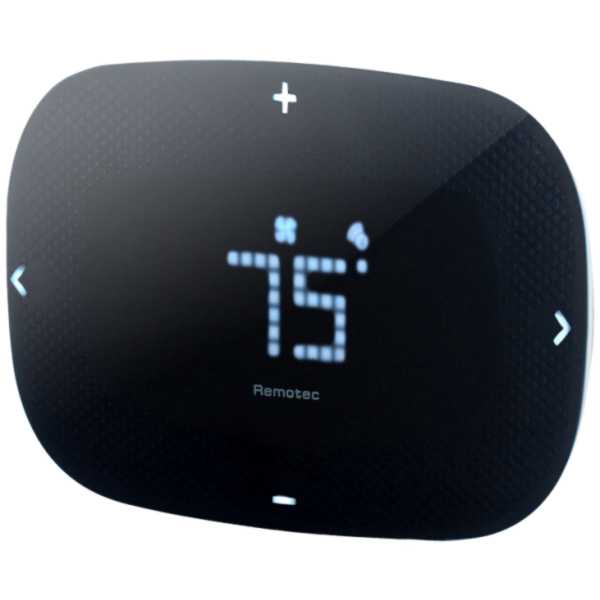
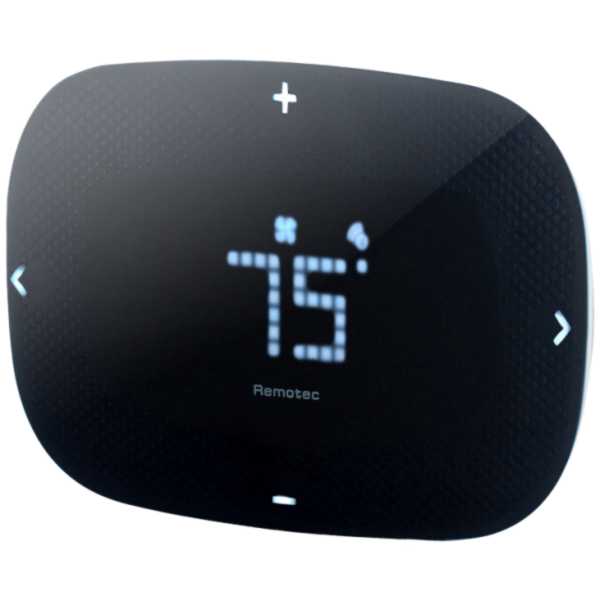
Short Description | The ZTS-500 is a smart programmable thermostat designed with the end user in mind. It combines compatibility with any Z-Wave certified controller or gateway with an incredibly simple and intuitive user interface. |
|---|
Long Description | ZTS-500 is a user-friendly Z-Wave programmable smart thermostat. The ZTS-500 is compatible with any Z-Wave certified controller or gateway and is designed to fit perfectly over most original thermostat installation marks without the need for a mounting board. The invisible 4-button back-illuminated interface combines a simple and intuitive interactive experience with a modern fashionable look. The flip-over terminal-board makes installation a breeze, The ZTS-500 allows utilization even in environments where a C wire is not available. With automatic power source detection (24Vac or Battery Power), it decide to maximizing battery life or acting as a range extender in the Z-Wave network, and all your connections will be safe and secure behind AES128 encryption. The ZTS-500’s available multi-color faceplates allow for seamless integration into a variety of interior designs. |
|---|
Brand | Remotec |
|---|
Product Identifier | ZTS-500US |
|---|
OEM Version | HW: 2 FW: 1.07:1.04 |
|---|
Hardware Platform | ZM5202 |
|---|
Z-Wave Version | 6.51.07 |
|---|
Library Type | SLAVE_ENHANCED_232 |
|---|
Device Type | Thermostat - HVAC |
|---|
Role Type | ROLE_TYPE_SLAVE_SLEEPING_LISTENING |
|---|
Manufacturer ID | 0x5254 |
|---|
Product Type ID | 0x0200 |
|---|
Product ID | 0x8170 |
|---|
User Icon | 0x1200 |
|---|
Installer Icon | 0x1200 |
|---|
Frequency Plans | US: 916.00MHz, 908.40MHz |
|---|
Categories | Thermostats |
|---|
Countries / Regions | United States of America |
|---|
Controlled Command Classes | Identifier | Name | Key | Version |
|---|
COMMAND_CLASS_BASIC | Basic | 0x20 | 1 |
|
|---|
Documents | Category | Description | File |
|---|
Manual_Primary_Lang | Product or Owner's Manual | |
|
|---|
Features | Feature | Values |
|---|
Battery Quantity | | Battery Type | | Firmware Updatable | Value |
|---|
Updatable by Consumer by RF |
| Thermostat HVAC Systems Supported | Value |
|---|
Heat Only | Cool Only | Multi Stage | Heat Pump |
| Thermostat Power Source | Value |
|---|
Battery | Power Stealing (hard-wired 24V) |
| Thermostat Modes | |
|
|---|
Association Groups | Group Number | Maximum Nodes Supported | End Point ID | Description |
|---|
1 | 1 | 0 | AUTO repoet | 2 | 3 | 0 | Heater | 3 | 3 | 0 | Compressor |
|
|---|
Configuration Parameters | Parameter Number | Name | Description | Format | Size | Min Value | Max Value | Default Value | Parameter Values |
|---|
2 | Swing | Swing Settings allows you to change the span on the temperature when your heating or cooling will kick in. | 0 | 2 | 0 | 0 | 2 | | 3 | Differential | Set the difference temperature between room temperature and target temperature where a second stage will turn on in a heater or compressor with multiple stage. Remark : ONLY for multiple stage system | 0 | 2 | 0 | 0 | 2 | | 4 | Dead band | On thermostats that automatically control both heating and cooling systems, a dead band is a temperature range in which neither system turns on. The dead band prevents the thermostat from activating heat and cooling in rapid succession. This conserves energy by providing a range of temperatures requiring no energy consumption | 0 | 2 | 0 | 0 | 4 | | 5 | Heat Set Point | Upper limit of Heat Set Point | 0 | 2 | 0 | 0 | 95 | From | To | Description |
|---|
41 | 99 | Fahrenheit unit |
| 6 | Cool Set Point | Lower limit of Cool Set Point | 0 | 2 | 0 | 0 | 45 | From | To | Description |
|---|
41 | 99 | Fahrenheit unit |
| 7 | Reset Filter Counter | Reset Filter Counter | 0 | 2 | 0 | 0 | 0 | | 1 | Scale of temperature | Change the Unit of Temperature reading | 0 | 2 | 0 | 0 | 1 | | 8 | Set Filter Counter | Set Filter Counter (in Hours) | 0 | 2 | 0 | 0 | 500 | From | To | Description |
|---|
500 | 4000 | Hours |
| 9 | Report Filter Counter | Read Only | 0 | 2 | 0 | 0 | 0 | From | To | Description |
|---|
0 | 9999 | Hours |
| 10 | Sensor Temperature Calibration | Temperature Offset Value | 0 | 2 | 0 | 0 | 0 | | 11 | LED Brightness Level | Set the LED Display Brightness Level | 0 | 2 | 0 | 0 | 2 | |
|
|---|
Texts | ID | Description | Value |
|---|
1 | Inclusion | From the Standby screen, press > or < to navigate to the Z-Wave screen and the Z-Wave LED will continuously flash.
Tap + to include the ZTS-500US into the network.
- The “✔” symbol will be displayed on screen once the ZTS-500US is added into the network.
The Z-Wave disconnect icon will also be removed from the standby screen.
- The “x” symbol will be displayed on screen if there is no action (time out) or unable to include the ZTS-500US into the network. | 2 | Exclusion | Press and keep holding > or < for 3 seconds to navigate to the System Main (SYS) screen.
On the Z-Wave (Z-w) screen.
Tap + to exclude ZTS-500US from the network.
Press < to cancel and back to the previous screen. | 5 | Factory Reset | Press and keep holding > or < for 3 seconds to navigate to the System Main (SYS) screen.
Press > to navigate to the Reset (RST) screen.
Press + or - to select Yes.
Press and keep holding > for 2 seconds to confirm your selection.
Press < to cancel and back to the previous screen.
Use the RESET procedure ONLY when the primary Controller is missing or inoperable. |
|
|---|
Supports NWI | Yes |
|---|
Supports Explorer Frames | Yes |
|---|
Is Flirs | Yes |
|---|