Product Recognition | |
|---|
Certification Number | ZC10-18036076 |
|---|
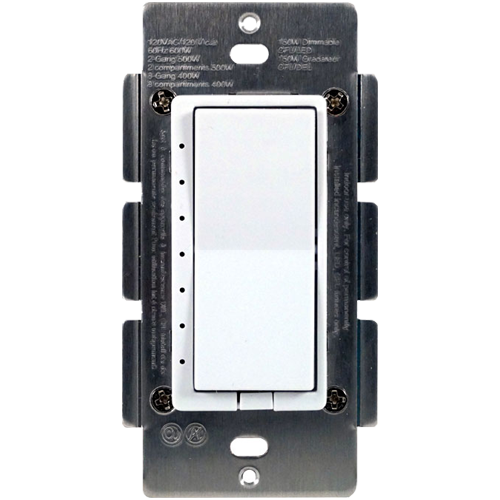
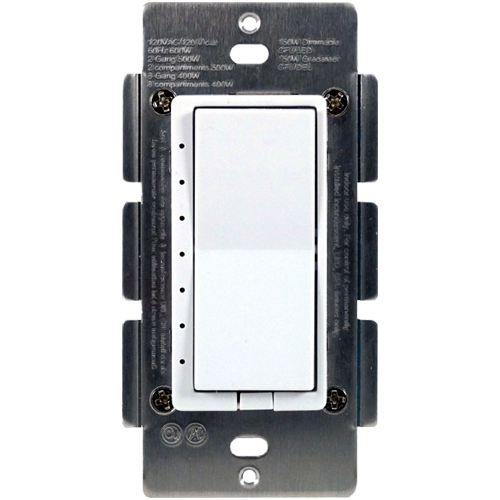
Name | Z-Wave Wall Dimmer |
|---|
Short Description | HS-WD100+ In Wall Dimmer Switch
- Replaces existing wall switch or dimmer
- Remotely or manually turns On, Off, or dim lights
- Z-Wave Plus certified with 500 series chipset
- Functions as a Z-Wave signal repeater
- Supports Central Scene
- Supports S2 Security |
|---|
Long Description | - Works with incandescent and dimmable florescent (CFL) and LED lighting
- ON/OFF/DIM status LED indicator
- Fits into standard single or multiple gang junction box
- Keypad can be replaced manually to match color with other wall switches
- Over-The-Air firmware upgrade available with compatible gateway, Z-Wave static controller, or PC and software
- Internal resettable fuse to protect from surge current
- Manual reset capability
- Supports Central Scene
- Supports S2 Security |
|---|
Brand | HomeSeer |
|---|
Product Identifier | HS-WD100+ |
|---|
OEM Version | HW: 255 FW: 50.03 |
|---|
Hardware Platform | ZM5202 |
|---|
Z-Wave Version | 6.81.00 |
|---|
Library Type | SLAVE_ENHANCED_232 |
|---|
Device Type | Light Dimmer Switch |
|---|
Role Type | ROLE_TYPE_SLAVE_ALWAYS_ON |
|---|
Manufacturer ID | 0x000C |
|---|
Product Type ID | 0x4447 |
|---|
Product ID | 0x3034 |
|---|
User Icon | 0x0600 |
|---|
Installer Icon | 0x0600 |
|---|
Frequency Plans | US: 916.00MHz, 908.40MHz |
|---|
Categories | All Lighting Devices, Dimming Lighting Devices |
|---|
Countries / Regions | United States of America |
|---|
Supported Command Classes | Identifier | Name | Key | Version |
|---|
COMMAND_CLASS_FIRMWARE_UPDATE_MD_V4 | Firmware Update Meta-Data V4 | 0x7A | 4 | COMMAND_CLASS_SCENE_ACTUATOR_CONF | Scene Actuator Conf | 0x2C | 1 | COMMAND_CLASS_POWERLEVEL | Powerlevel | 0x73 | 1 | COMMAND_CLASS_BASIC | Basic | 0x20 | 1 | COMMAND_CLASS_TRANSPORT_SERVICE_V2 | Transport Service V2 | 0x55 | 2 | COMMAND_CLASS_DEVICE_RESET_LOCALLY | Device Reset Locally | 0x5A | 1 | COMMAND_CLASS_ZWAVEPLUS_INFO_V2 | Z-Wave Plus Info V2 | 0x5E | 2 | COMMAND_CLASS_ASSOCIATION_V2 | Association V2 | 0x85 | 2 | COMMAND_CLASS_ASSOCIATION_GRP_INFO | Association Group Info | 0x59 | 1 | COMMAND_CLASS_SWITCH_MULTILEVEL_V4 | Switch Multilevel V4 | 0x26 | 4 | COMMAND_CLASS_CONFIGURATION_V3 | Configuration V3 | 0x70 | 3 | COMMAND_CLASS_SECURITY_2 | Security S2 | 0x9F | 1 | COMMAND_CLASS_MANUFACTURER_SPECIFIC | Manufacturer Specific | 0x72 | 1 | COMMAND_CLASS_VERSION_V3 | Version V3 | 0x86 | 3 | COMMAND_CLASS_CENTRAL_SCENE_V3 | Central Scene V3 | 0x5B | 3 | COMMAND_CLASS_SUPERVISION | Supervision | 0x6C | 1 | COMMAND_CLASS_SCENE_ACTIVATION | Scene Activation | 0x2B | 1 |
|
|---|
Controlled Command Classes | Identifier | Name | Key | Version |
|---|
COMMAND_CLASS_CENTRAL_SCENE_V3 | Central Scene V3 | 0x5B | 3 | COMMAND_CLASS_SUPERVISION | Supervision | 0x6C | 1 |
|
|---|
S2 Classes | S2_UNAUTHENTICATED, S2_AUTHENTICATED |
|---|
Documents | Category | Description | File |
|---|
Manual_Primary_Lang | Product or Owner's Manual | |
|
|---|
Features | Feature | Values |
|---|
Color | | Electric Load Type | Value |
|---|
Incandescent | Dimmable LED | Dimmable Fluorescent | Dimmable MLV (Magnetic) |
| Switch Load Capacity Watts | Value |
|---|
600 Watts Incandescent |
| Neutral Wire Required | | Outdoor Use | | Switch Type | Value |
|---|
Decorator Paddle Rocker |
| Z-Wave Scene Type | Value |
|---|
Scene & Central Scene |
| Firmware Updatable | Value |
|---|
Updatable by Consumer by RF |
|
|
|---|
Association Groups | Group Number | Maximum Nodes Supported | End Point ID | Description |
|---|
1 | 5 | 0 | Z-Wave Plus Lifeline |
|
|---|
Configuration Parameters | Parameter Number | Name | Description | Format | Size | Min Value | Max Value | Default Value | Parameter Values |
|---|
10 | indicates the time duration of each level | The time interval of brightness change between dimming up and down can be adjusted Valid Values: 1-255 (default = 3), indicates the time duration of each level. | 0 | 2 | 0 | 0 | 3 | From | To | Description |
|---|
1 | 255 | indicates the time duration of each level. |
| 8 | turning On or Off the lights via remote control or scheduled program | Turning On or Off the lights via remote control or scheduled program Valid Values: 1-255 (default = 3), indicates the time duration of each level when the light is controlled by remote | 0 | 2 | 0 | 0 | 3 | From | To | Description |
|---|
1 | 255 | indicates the time duration of each level when the light is controlled by remote |
| 9 | indicates the number of levels | The time interval of brightness change between dimming up and down can be adjusted Length: 1 Byte Valid Values: 1-99 (default = 1), indicates the number of levels the lighting will change when the timer runs out. | 0 | 1 | 0 | 0 | 1 | From | To | Description |
|---|
1 | 99 | indicates the number of levels the lighting will change when the timer runs out. |
| 7 | turning On or Off the lights via remote control | Turning On or Off the lights via remote control Valid Values: 1-99 (default = 1), indicates the number of levels when the light is controlled by remote. Lower this number, the finer the control of dimming. Higher the number the faster the dimming | 0 | 1 | 0 | 0 | 1 | From | To | Description |
|---|
1 | 99 | indicates the number of levels when the light is controlled by remote |
| 4 | the orientation of the ON/OFF on the rocker switch | the orientation of the ON/OFF on the rocker switch can be inverted | 0 | 1 | 0 | 0 | 0 | From | To | Description |
|---|
1 | 1 | the connected light will turn OFF by pressing the top side of the rocker switch and turn ON by pressing the bottom side. | 0 | 0 | the connected light will turn ON by pressing the top side of the rocker switch and turn OFF by pressing the bottom side. |
|
|
|---|
Texts | ID | Description | Value |
|---|
5 | Factory Reset | Please use this procedure only in the event that the network primary controller is lost or otherwise inoperable.
All Configuration Parameters can all be restored to their factory default settings by using your primary controller to delete/reset the device.
To manually reset, tap the ON button twice quickly and then tap the OFF button twice quickly. Repeat the procedure to restore the settings to the factory default. | 2 | Exclusion | 1. Turn the connected appliance ON/OFF by tapping the switch. Tapping and releasing the upper part of the rocker turns the appliance ON. Tapping and releasing the lower part of the rocker turns the appliance OFF.
2. Delete(Exclude) the module to/from your Z-Wave network with your primary controller. Please refer to the instructions manual of your gateway or remote controller for details and procedures on how these actions can be done.
3. Normally, the sequence is as follows: when the exclusion process is prompted by your primary controller, single click and release the rocker switch. The controller should show that the action was successful. If the controller shows it was a fail, repeat the procedure. | 1 | Inclusion | 1. Turn the connected lights ON/OFF by tapping the switch. Tapping and releasing the upper part of the rocker turns the appliance ON. Tapping and releasing the lower part of the rocker turns the appliance OFF.
2. Add(Include) the module to/from your Z-Wave network with your primary controller. Please refer to the instructions manual of your gateway or remote controller for details and procedures on how these actions can be done.
3. Normally, the sequence is as follows: when the inclusion process is prompted by your primary controller, single click and release the rocker switch to ON or OFF position. The controller should show that the action was successful. If the controller shows it was a fail, repeat the procedure. | 6 | Additional Special Features | Z-Wave Plus introduces a new process for scene activation – “Central Scene
Control”. Press and release the button, it will send a certain command to the central controller via the lifeline association group 1. This allows the controller to react to key pressed, key released and key held down.
- Press and release the top button, “Scene 001 Key Pressed” preset by the Gateway will be turned ON.
- Press the top button twice, “Scene 001 Key Pressed Twice” preset by the Gateway will be turned ON.
- Press the top button 3 times, “Scene 001 Key Pressed 3 Times” preset by the Gateway will be turned ON.
- Press and release the bottom button, “Scene 002 Key Pressed” preset by the Gateway will be turned ON.
- Press the bottom button twice, “Scene 002 Key Pressed Twice” preset by the Gateway will be turned ON.
- Press the bottom button 3 times, “Scene 002 Key Pressed 3 Times” preset by the Gateway will be turned ON. |
|
|---|
Supports NWI | Yes |
|---|
Supports Explorer Frames | Yes |
|---|
Supports SmartStart | Yes |
|---|
Radio Range Z-Wave (m) | 40 |
|---|