Product Recognition | |
|---|
Certification Number | ZC10-16075137 |
|---|
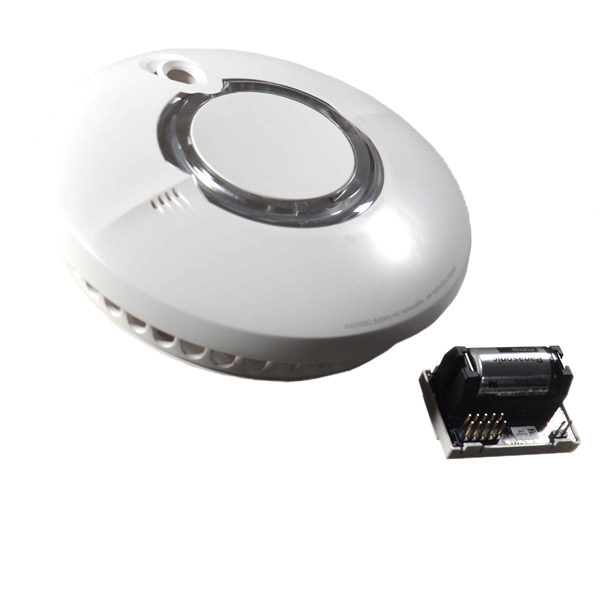
Name | ZST-630 Thermoptek Smoke Alarm/Smoke Detector |
|---|
Short Description | This is a module that plugs into a ST-630 Smoke alarm (or variant thereof) to add Z-Wave Plus functionality to these alarms. |
|---|
Long Description | This wireless module is designed to be installed in a Z-Wave compatible smoke alarm which offers an additional option for wireless connectivity, with extended features and capabilities that enhance the end user experience.
Thermoptek technology combines the very latest in optical sensing with a thermal enhancement. It constantly monitors for temperature change and if a sudden rate of temperature rise is detected the sensitivity of the alarm is increased.
FireAngel smoke detection technology is used and trusted by the UK Fire and Rescue services.
The alarm sensor has a 10 year sealed for life Panasonic battery inside that will power the alarm for life. The Z-Wave module has a 2 year removable CR2 battery.
When the wireless module is fitted into a Z-Wave compatible smoke or heat alarm it enables the unit to be wirelessly interlinked to a third party Z-Wave Controller. When any of the interlinked products are triggered by smoke or heat, the unit will transmit messages to the main Controller. |
|---|
Brand | Fireangel |
|---|
Product Identifier | ZST-630 |
|---|
OEM Version | HW: 255 FW: 1.04 |
|---|
Hardware Platform | ZM5101 |
|---|
Z-Wave Version | 6.51.07 |
|---|
Library Type | SLAVE_ENHANCED_232 |
|---|
Device Type | Notification Sensor |
|---|
Role Type | ROLE_TYPE_SLAVE_SLEEPING_REPORTING |
|---|
Manufacturer ID | 0x026F |
|---|
Product Type ID | 0x0001 |
|---|
Product ID | 0x0001 |
|---|
User Icon | 0x0C01 |
|---|
Installer Icon | 0x0C01 |
|---|
Frequency Plans | EU: 869.85MHz, 868.40MHz |
|---|
Categories | Sensors |
|---|
Countries / Regions | European Union |
|---|
Documents | Category | Description | File |
|---|
Manual_Primary_Lang | Product or Owner's Manual | |
|
|---|
Features | Feature | Values |
|---|
Battery Quantity | | Battery Type | | Communications Connections | Value |
|---|
Manufacturer Proprietary |
| Sensors | Value |
|---|
Air Temperature | Smoke Density | Heat |
|
|
|---|
Association Groups | Group Number | Maximum Nodes Supported | End Point ID | Description |
|---|
1 | 5 | 0 | Z-Wave Plus Lifeline |
|
|---|
Texts | ID | Description | Value |
|---|
4 | Device Wake-Up | Waking the Module
If the module has been successfully included, when pressing the button, the LED will flash three times. In addition, the module will communicate with the Z-Wave Controller, accepting any pending commands. | 1 | Inclusion | ‘ADDING’ YOUR Z-WAVE UNITS
Do not attempt to add your Z-Wave Module unless you are familiar with the operation of your Z-Wave Controller.
1. Read the instructions for your Z-Wave Controller regarding adding new devices. Then initiate the inclusion function from your Z-Wave Controller.
2. Triple-press the add button once the Z-Wave Module is on the device. The LED will show a quick blink once per second while the module is being added. This process may take as long as 30 seconds, but typically is much quicker. If you triple-press too quickly or too slowly, inclusion will not start. In this case wait a few seconds and then try again.
3. Upon successful inclusion, the Z-Wave Module LED will flash 3 times. If inclusion fails, the LED will simply stop its blink pattern.
4. If inclusion does not succeed, restart at step 1.
5. If successful, place the alarm on its base and wait at least 30 seconds.
6. Press the alarm’s test button and verify the Z-Wave Controller receives Notification Reports.
7. After the Z-Wave Module is included, you may define association groups or perform other configuration operations from the Z-Wave Controller. | 2 | Exclusion | ‘REMOVING’ YOUR Z-WAVE UNITS
1. Read the instructions on your Z-Wave Controller regarding removing devices. Note that a device can be removed using any Z-Wave Controller, not just the Controller that was used to add the Module. Initiate the removal process at your Controller.
2. Triple-press the button on the Z-Wave Module. The LED will show a quick double-blink once per second while the module is being removed. This process may take up to 30 seconds. If you triple-press too quickly or too slowly the removing function will not start. In this case you must wait a few seconds and then try again.
3. Upon successful removal, the Z-Wave Module LED will flash 5 times. If removal fails, the LED will simply stop its blink pattern.
4. If the removal operation does not succeed, restart at step 1.
5. After removing, either a) add the Z-Wave Module into a different Z-Wave Controller, or b) remove the battery from the Z-Wave Module.
NOTE: The effective range of the wireless module may be reduced by walls and other obstructions in the building. It is recommended not to exceed 40m as the maximum distance between smoke alarms and the Controller. | 5 | Factory Reset | ‘FACTORY RESET’ YOUR Z-WAVE UNITS
This operation should only be performed if the module is to be excluded from the network and if the Z-Wave Controller is also being reset or removed.
1. Press and hold the button for 10 seconds. The LED will go off. Now release the button. The LED will flash once as the module resets.
2. After resetting, either a) include the module into a different Z-Wave Controller, or b) remove the battery from the module to avoid power draining.
* use the reset procedure only when the primary controller is missing or inoperable. | 6 | Additional Special Features | - For use with ST-630 (Smoke Alarm) & HT-630 (Heat Alarm).
- 3V removable (CR2) lithium battery.
- Z-Wave Plus™ ‘Next Gen’ Z-Wave hardware platform.
- Z-Wave Plus certified solutions feature a selected set of extended features and capabilities that enhance the end user experience and make Z-Wave installations even faster and easier to install and set up.
50% improvement in battery life.
67% improvement in range.
250% more bandwidth.
This product can be included and operated in any Z-Wave network with other Z-Wave certified devices from other manufacturers. All non-battery operated devices within the network will act as repeaters regardless of vendor to increase reliability of the network. |
|
|---|
Supported Multilevel Sensors | Multilevel Sensor Type |
|---|
Air temperature | Smoke density |
|
|---|
Supports NWI | Yes |
|---|
Supports Explorer Frames | Yes |
|---|