Product Recognition | |
|---|
Certification Number | ZC10-19046451 |
|---|
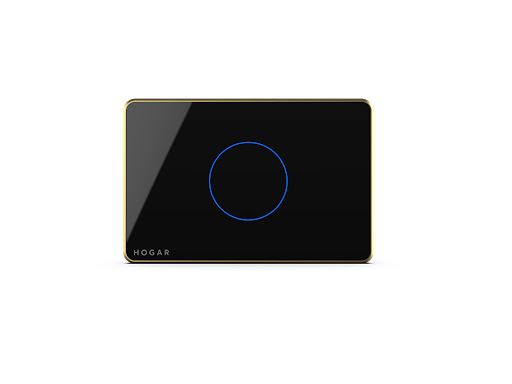
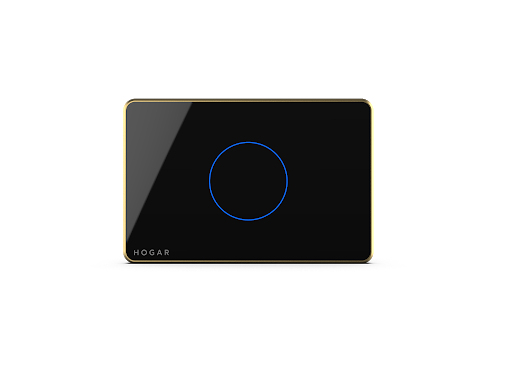
Name | 1 Touch Panel Switch |
|---|
Short Description | The Hogar 1 Touch Switch is a perfect replacement for your conventional single-channel relay switch used to turn devices on or off. The 1 Touch Switch can be configured to work with any device that works with single-channel relay switches. |
|---|
Long Description | With a stunning glass face and an advanced capacitive touch sensor, all you need to do is just use a finger for turning your lights on and off. Tap once on the backlit touch button to switch the device on and tap it again to turn it off, it’s that simple. This 1 Touch Switch ensures an accurate response to every command that is sent through it.
The Hogar 1 Touch Switch can operate either independently or as a part of the Hogar smart home automation system, and even with any other certified Z-Wave home automation system. It is an extremely easy-to-use panel that can be installed in a standard AU 2 gang box. Its operating capabilities include a bi-stable mode, a relay mode or a touch pulse mode for scene control with a maximum load current of 3 amp. It communicates with the Hogar smart home automation system using the Z-Wave wireless communication protocol. |
|---|
Brand | Hogar Controls |
|---|
Product Identifier | HTP-1S0 |
|---|
OEM Version | HW: 255 FW: 2.50 |
|---|
Hardware Platform | ZM5202 |
|---|
Z-Wave Version | 6.81.01 |
|---|
Library Type | SLAVE_ENHANCED_232 |
|---|
Device Type | On/Off Power Switch |
|---|
Role Type | ROLE_TYPE_SLAVE_ALWAYS_ON |
|---|
Manufacturer ID | 0x0293 |
|---|
Product Type ID | 0x0003 |
|---|
Product ID | 0x4411 |
|---|
User Icon | 0x0700 |
|---|
Installer Icon | 0x0700 |
|---|
Frequency Plans | ANZ: 919.80MHz, 921.40MHz |
|---|
Categories | All Lighting Devices, On/Off Switches/Devices |
|---|
Countries / Regions | Australia |
|---|
Supported Command Classes | Identifier | Name | Key | Version |
|---|
COMMAND_CLASS_FIRMWARE_UPDATE_MD_V4 | Firmware Update Meta-Data V4 | 0x7A | 4 | COMMAND_CLASS_POWERLEVEL | Powerlevel | 0x73 | 1 | COMMAND_CLASS_MULTI_CHANNEL_ASSOCIATION_V3 | Multi-Channel Association V3 | 0x8E | 3 | COMMAND_CLASS_SWITCH_BINARY | Switch Binary | 0x25 | 1 | COMMAND_CLASS_BASIC | Basic | 0x20 | 1 | COMMAND_CLASS_TRANSPORT_SERVICE_V2 | Transport Service V2 | 0x55 | 2 | COMMAND_CLASS_DEVICE_RESET_LOCALLY | Device Reset Locally | 0x5A | 1 | COMMAND_CLASS_ZWAVEPLUS_INFO_V2 | Z-Wave Plus Info V2 | 0x5E | 2 | COMMAND_CLASS_ASSOCIATION_V2 | Association V2 | 0x85 | 2 | COMMAND_CLASS_ASSOCIATION_GRP_INFO | Association Group Info | 0x59 | 1 | COMMAND_CLASS_SECURITY_2 | Security S2 | 0x9F | 1 | COMMAND_CLASS_VERSION_V3 | Version V3 | 0x86 | 3 | COMMAND_CLASS_SUPERVISION | Supervision | 0x6C | 1 | COMMAND_CLASS_MANUFACTURER_SPECIFIC_V2 | Manufacturer Specific V2 | 0x72 | 2 |
|
|---|
Controlled Command Classes | Identifier | Name | Key | Version |
|---|
COMMAND_CLASS_SWITCH_BINARY | Switch Binary | 0x25 | 1 | COMMAND_CLASS_BASIC | Basic | 0x20 | 1 |
|
|---|
S2 Classes | S2_UNAUTHENTICATED |
|---|
Documents | Category | Description | File |
|---|
Manual_Primary_Lang | Product or Owner's Manual | |
|
|---|
Features | Feature | Values |
|---|
Switch Load Capacity Current | | Switch Load Capacity Watts | | Neutral Wire Required | | Firmware Updatable | Value |
|---|
Updatable by Professional/Technician |
| Electric Load Type | Value |
|---|
Incandescent | Fluorescent | MLV (Magnetic) | ELV (Electronic) | LED | Dimmable LED | Inductive (e.g. Motor) | Dimmable Fluorescent | Dimmable MLV (Magnetic) | Dimmable ELV (Magnetic) |
|
|
|---|
Association Groups | Group Number | Maximum Nodes Supported | End Point ID | Description |
|---|
2 | 5 | 0 | Name: HGT-01 Command: - Basic Set Device support control another device through root device association group #2~#3, and each group support 5 destination nodes maximum. | 3 | 5 | 0 | Name: HGT-01 Command: - Switch Binary Set Device support control another device through root device association group #2~#3, and each group support 5 destination nodes maximum. | 1 | 5 | 0 | Name: Lifeline Command: - Device Reset Locally Notification - Switch Binary Report |
|
|---|
Texts | ID | Description | Value |
|---|
2 | Exclusion | 1. Put the controller into REMOVE device mode. Follow the instructions provided by the controller manufacturer.
2. Touch and hold any key on the panel for more than 5 seconds. All indication lights will blink blue in color. At this point release the key, the touch panel will start the exclusion process. | 1 | Inclusion | 1. Put the controller into ADD device mode. Follow the instructions provided by the controller manufacturer.
2. Touch and hold any key on the panel for more than 5 seconds. All indication lights will blink in blue. At this point release the key, the touch panel will start the inclusion process. | 5 | Factory Reset | 1. Press the config button 5 times, Indication LED lights will blink red in color, touch panel will start local reset.
Touch panel switch will erase network inclusion state after local reset. Please use this procedure only when the network primary controller is missing or otherwise inoperable |
|
|---|
Supports NWI | Yes |
|---|
Supports Explorer Frames | Yes |
|---|
Radio Range Z-Wave (m) | 40 |
|---|