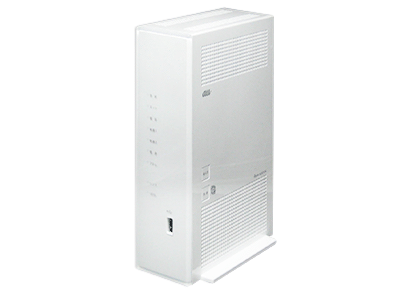
Product Recognition | |
|---|
Certification Number | ZC10-17085717 |
|---|
Name | BL 902HW |
|---|
Short Description | Gateway device for fixed network (FTTH) service provided by KDDI. |
|---|
Long Description | BL900HW is the service gateway device to provide the KDDI's FTTH service.
So this can be used only in KDDI's network.
This also has the following features
・Wireless router technology : IEEE 802.11a/b/g/n dual band.
・Number of USB Ports:USB2.0 × 1 port
・Number of Ether port : 1Gbps × 4port type RJ45
・Dial-up port :1port type RJ11
When you use this device as the z-wave gateway, you have to subscribe the KDDI's FTTH service and plug the special dongle provided by KDDI to USB port.
-----
Diference from BL900
1. Change of Product appearance
2. Change of Model Number and Product name
3. VDSL Modem type
These changes does not affect Z-Wave behavior and functionality at all. |
|---|
Brand | au |
|---|
Product Identifier | H03HV2 |
|---|
OEM Version | HW: 1 FW: 4.54:01.07 |
|---|
Hardware Platform | ZM5101 |
|---|
Z-Wave Version | 6.51.10 |
|---|
Library Type | CONTROLLER_STATIC |
|---|
Device Type | Central Controller |
|---|
Role Type | ROLE_TYPE_CONTROLLER_CENTRAL_STATIC |
|---|
Manufacturer ID | 0x0337 |
|---|
Product Type ID | 0x0001 |
|---|
Product ID | 0x0003 |
|---|
User Icon | 0x0100 |
|---|
Installer Icon | 0x0100 |
|---|
Frequency Plans | JP: 922.50MHz, 923.90MHz, 926.30MHz |
|---|
Categories | All Controllers, Gateway Controller |
|---|
Countries / Regions | Japan |
|---|
Supported Command Classes | Identifier | Name | Key | Version |
|---|
COMMAND_CLASS_POWERLEVEL | Powerlevel | 0x73 | 1 | COMMAND_CLASS_APPLICATION_STATUS | Application Status | 0x22 | 1 | COMMAND_CLASS_CRC_16_ENCAP | CRC16 Encapsulation | 0x56 | 1 | COMMAND_CLASS_SECURITY | Security S0 | 0x98 | 1 | COMMAND_CLASS_VERSION_V2 | Version V2 | 0x86 | 2 | COMMAND_CLASS_DEVICE_RESET_LOCALLY | Device Reset Locally | 0x5A | 1 | COMMAND_CLASS_ZWAVEPLUS_INFO_V2 | Z-Wave Plus Info V2 | 0x5E | 2 | COMMAND_CLASS_ASSOCIATION_V2 | Association V2 | 0x85 | 2 | COMMAND_CLASS_ASSOCIATION_GRP_INFO_V3 | Association Group Information V3 | 0x59 | 3 | COMMAND_CLASS_MANUFACTURER_SPECIFIC | Manufacturer Specific | 0x72 | 1 |
|
|---|
Controlled Command Classes | Identifier | Name | Key | Version |
|---|
COMMAND_CLASS_MULTI_CHANNEL_ASSOCIATION_V3 | Multi-Channel Association V3 | 0x8E | 3 | COMMAND_CLASS_BATTERY | Battery | 0x80 | 1 | COMMAND_CLASS_SWITCH_BINARY | Switch Binary | 0x25 | 1 | COMMAND_CLASS_BASIC | Basic | 0x20 | 1 | COMMAND_CLASS_CONFIGURATION | Configuration | 0x70 | 1 | COMMAND_CLASS_CRC_16_ENCAP | CRC16 Encapsulation | 0x56 | 1 | COMMAND_CLASS_SECURITY | Security S0 | 0x98 | 1 | COMMAND_CLASS_SENSOR_BINARY_V2 | Sensor Binary V2 | 0x30 | 2 | COMMAND_CLASS_SENSOR_MULTILEVEL_V7 | Sensor Multilevel V7 | 0x31 | 7 | COMMAND_CLASS_VERSION_V2 | Version V2 | 0x86 | 2 | COMMAND_CLASS_WAKE_UP_V2 | Wake Up V2 | 0x84 | 2 | COMMAND_CLASS_ASSOCIATION_V2 | Association V2 | 0x85 | 2 | COMMAND_CLASS_MULTI_CHANNEL_V4 | Multi-Channel V4 | 0x60 | 4 | COMMAND_CLASS_ASSOCIATION_GRP_INFO_V3 | Association Group Information V3 | 0x59 | 3 | COMMAND_CLASS_NOTIFICATION_V5 | Notification V5 | 0x71 | 5 | COMMAND_CLASS_METER_V4 | Meter V4 | 0x32 | 4 |
|
|---|
Documents | Category | Description | File |
|---|
Manual_Primary_Lang | Product or Owner's Manual | |
|
|---|
Features | Feature | Values |
|---|
Firmware Updatable | Value |
|---|
Updatable by Manufacturer |
| Color | | Gateway Has Preferred Partners | | Supported Notification Types | | Sensors | Value |
|---|
Motion/No Motion (Binary) | Air Temperature | Luminance | Humidity | Open/Closed (Binary) |
|
|
|---|
Association Groups | |
|---|
Texts | ID | Description | Value |
|---|
23 | Controller Inclusion | It is to select the kinds of device by Smartphone application, and it induces to push down the program switch of device. | 24 | Controller Exclusion | It is select the registered device by Smartphone application, and it induces to push down the program switch of device. | 5 | Factory Reset | 1.It is to pull out the power outlet on HOME Gateway, and wait for approximately 10 seconds.
2.It is to hold down the update button on back side ,and at the same time insert the power outlet.
After approximately 20 seconds it blinks 3 times at the same time on Update lump ,Network lump, Telephone lump, Wireless 1 lump, Wireless 2 lump, and Power lump, release your hands from the update button.
※Don't power off on HOME Gateway until completed initialize, because it is the cause of breakdown.
""If this controller is the primary controller for your network, resetting it will result in the nodes in your network being orphaned and it will be necessary after the reset to exclude and re-include all of the nodes in the network. If this controller is being used as a secondary controller in the network, use this procedure to reset this controller only in the event that the network primary controller is missing or otherwise inoperable."" |
|
|---|
Supports NWI | Yes |
|---|
Supports Explorer Frames | Yes |
|---|
Radio Range Z-Wave (m) | 40 |
|---|