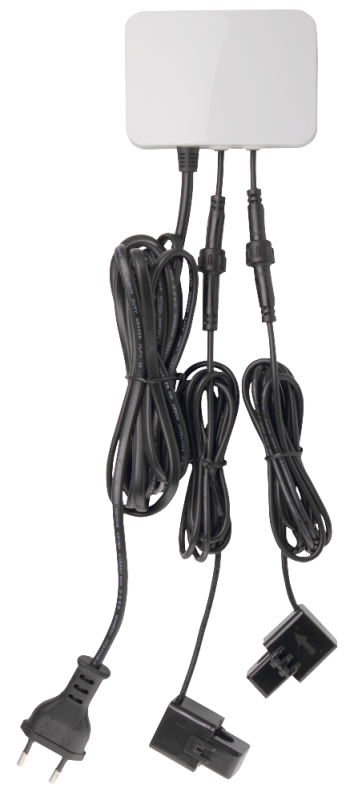
| Product Recognition | |
|---|
| Certification Number | ZC10-17035457 |
|---|
| Name | Clamp Meter |
|---|
| Short Description | CL Meter is an energy metering device designed to measure, monitor, and report the energy consumption of an entire household or apartment building directly from the electric box or breaker panel, for users to look for energy-saving opportunities or provide tenant-specific billing. |
|---|
| Long Description | CL Meter is an energy metering device designed to measure, monitor, and report the energy consumption of an entire household or apartment building directly from the electric box or breaker panel, for users to look for energy-saving opportunities or provide tenant-specific billing. Installed directly in the home’s main circuit box, with the clamps attached to it, the CLMT-1ZW will monitor the total amount of electricity the entire home uses with accuracy and speed. With the CL Meter, users can easily track their power usage, allowing them to make the most out of reducing energy consumption and achieving greater energy efficiency. |
|---|
| Brand | Climax Technology |
|---|
| Product Identifier | CLMT-1ZW |
|---|
| OEM Version | HW: 255 FW: 1.29 |
|---|
| Hardware Platform | ZM5202 |
|---|
| Z-Wave Version | 6.61.00 |
|---|
| Library Type | SLAVE_ENHANCED_232 |
|---|
| Device Type | Whole Home Meter - Simple |
|---|
| Role Type | ROLE_TYPE_SLAVE_ALWAYS_ON |
|---|
| Manufacturer ID | 0x018E |
|---|
| Product Type ID | 0x0004 |
|---|
| Product ID | 0x001D |
|---|
| User Icon | 0x1700 |
|---|
| Installer Icon | 0x1700 |
|---|
| Frequency Plans | EU: 869.85MHz, 868.40MHz |
|---|
| Categories | Energy Meters |
|---|
| Countries / Regions | European Union |
|---|
| Supported Command Classes | | Identifier | Name | Key | Version |
|---|
| COMMAND_CLASS_POWERLEVEL | Powerlevel | 0x73 | 1 | | COMMAND_CLASS_MULTI_CHANNEL_ASSOCIATION_V3 | Multi-Channel Association V3 | 0x8E | 3 | | COMMAND_CLASS_CRC_16_ENCAP | CRC16 Encapsulation | 0x56 | 1 | | COMMAND_CLASS_VERSION_V2 | Version V2 | 0x86 | 2 | | COMMAND_CLASS_DEVICE_RESET_LOCALLY | Device Reset Locally | 0x5A | 1 | | COMMAND_CLASS_ZWAVEPLUS_INFO_V2 | Z-Wave Plus Info V2 | 0x5E | 2 | | COMMAND_CLASS_ASSOCIATION_V2 | Association V2 | 0x85 | 2 | | COMMAND_CLASS_MULTI_CHANNEL_V4 | Multi-Channel V4 | 0x60 | 4 | | COMMAND_CLASS_FIRMWARE_UPDATE_MD_V2 | Firmware Update Meta-Data V2 | 0x7A | 2 | | COMMAND_CLASS_MANUFACTURER_SPECIFIC_V2 | Manufacturer Specific V2 | 0x72 | 2 | | COMMAND_CLASS_METER_V2 | Meter V2 | 0x32 | 2 | | COMMAND_CLASS_ASSOCIATION_GRP_INFO_V2 | Association Group Information V2 | 0x59 | 2 |
|
|---|
| Documents | |
|---|
| Features | | Feature | Values |
|---|
| Supported Meter Type | | | Color | | | Firmware Updatable | | Value |
|---|
| Updatable by Professional/Technician |
|
|
|---|
| Association Groups | | Group Number | Maximum Nodes Supported | End Point ID | Description |
|---|
| 1 | 1 | 0 | Group 1 for “LifeLine”: (maximum node:1)
Device Reset Locally CC, V2
Meter CC, V2
For group 1, the Clamp Meter will report:
(1) The sum of instant Power Consumption (Watt) read from
CT1 and CT2
(2) The sum of accumulated Power Consumption (KWh) read
from CT1 and CT2
| | 2 | 1 | 0 | Group 2 for “meter CT1” (maximum node: 1)
Meter CC, V2
For group 2, the Switch will report:
(1) Instant Power Consumption (Watt) read from CT1
(2) Accumulated Power Consumption (KWh) read from CT1
| | 3 | 1 | 0 | Group 3 for “meter CT2”: (maximum node: 1)
Meter CC, V2
For group 3, the Switch will report
(1) The sum of instant Power Consumption (Watt) read from
CT2
(2) The sum of accumulated Power Consumption (KWh) read
from CT2
|
|
|---|
| Texts | | ID | Description | Value |
|---|
| 2 | Exclusion | The device must be removed from existing Z-Wave network before being added into another.
Exclusion Mode
-Put the Z-Wave Gateway or Control Panel into Exclusion mode
(please refer to the Z-Wave or control panel manual).
-Within 1.5 seconds, press the Function Button 3 times and the
device will be removed from the Z-Wave network. | | 1 | Inclusion | This product can be included and operated in any Z-Wave network with other Z-Wave certified devices from other manufactures and/or other applications. All non-battery operated nodes within the network will act as repeaters regardless of vendor to increase reliability of the network.
-Plug in the AC Input cable into the socket to power on the Clamp
Meter.
-Put the Control Panel into Inclusion mode (please refer to the Z-
Wave control panel manual).
-Within 1.5 seconds, press the Function Button 3 times.
-Refer to the operation manual of Z-Wave Gateway or Control Panel
to complete the adding process.
-If the device has already been added (included) into another Z-Wave
Gateway/Control Panel, or if the device is unable to be added into
the current Z-Wave Gateway/Control Panel, try removing it first (see
Removing Device). | | 5 | Factory Reset | Factory resetting the device will restore it to factory default settings (i.e. not included into any Z-Wave network). Please only use this procedure if the Z-Wave Gateway or Control Panel is lost or otherwise inoperable.
-Press and hold the Function Button of the device for 10 seconds to
factory reset. |
|
|---|
| Supported / Controlled Meter Types | | Meter Type | Rate Type | Description |
|---|
| Electric meter | Import | Electric Meter Consumption |
|
|---|
| Supports NWI | Yes |
|---|
| Supports Explorer Frames | Yes |
|---|