
Product Recognition | |
|---|---|
Certification Number | ZC10-15100011 |
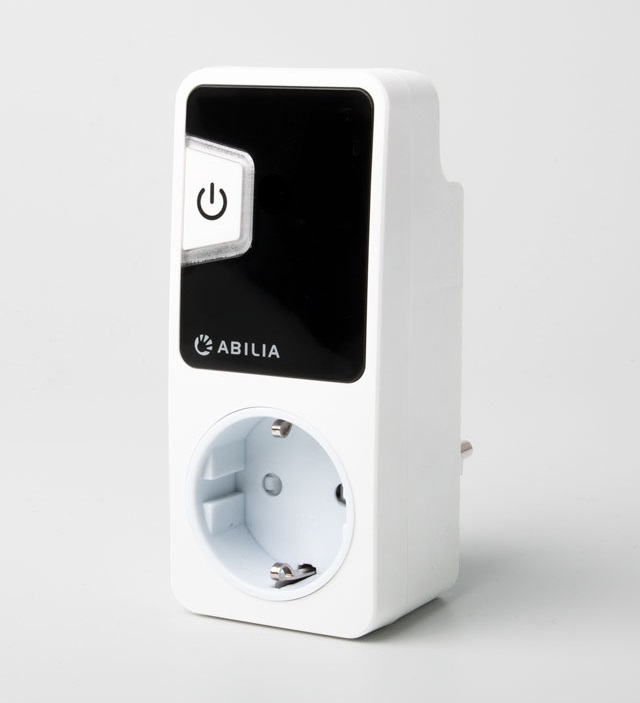
Name | Gewa Andromeda Socket |
Short Description | Gewa Andromeda Socket is an ON/OFF plug. Can be controlled with Z-Wave and Infra-Red remote control. External wired switch can be connected as well. Maximum 3600 VA resistive load. |
Long Description | Independence
Gewa Andromeda socket is specially adapted for disabled people who want to live a more independent life, such as wireless, can turn on/off lights, turn on/off various devices and can easily be moved between different outlets.
Flexible control modes
It can be controlled in three different ways, with an IR transmitter (GewaLink system), a radio transmitter (Z-Wave) or a connected control switch.
Built-in on/off button
Andromeda Socket also has a built-in on/off switch that makes you always can operate the device even if one has no IR/radio transmitter. It also has a blue indicator light that shows if the switch is on.
Easy to program
It is easy to program, as is done with the built-in on/off button.
Andromeda socket available in different versions for different countries.
Technical data
Operating voltage: 230V AC, 50 Hz
Maximum load: 3600VA 16A resistive load
Programming Channels IR: GewaLink channels
Radio: Z-wave
Radio frequency: 868.42 MHz
Socket for control switch: 3.5 mm (2-pole mono female)
Operating environment: indoors (IP 21)
Dimensions: 53 x 122 x 43mm (excluding connector plug) |
Brand | Abilia AB |
Product Identifier | 419880 |
OEM Version | 04 |
Hardware Platform | ZM5101 |
Z-Wave Version | 6.51.06 |
Library Type | SLAVE_ROUTING |
Device Type | On/Off Power Switch |
Role Type | ROLE_TYPE_SLAVE_ALWAYS_ON |
Manufacturer ID | 0x0117 |
Product Type ID | 0x0001 |
Product ID | 0x0080 |
Frequency Plans | EU: 869.85MHz, 868.40MHz |
Categories | All Lighting Devices, On/Off Switches/Devices |
Countries / Regions | European Union |
Documents | |
Association Groups | |
Texts | |
Supports NWI | Yes |
Supports Explorer Frames | Yes |
Radio Range Z-Wave (m) | 40 |