Product Recognition | |
|---|
Certification Number | ZC10-16025001 |
|---|
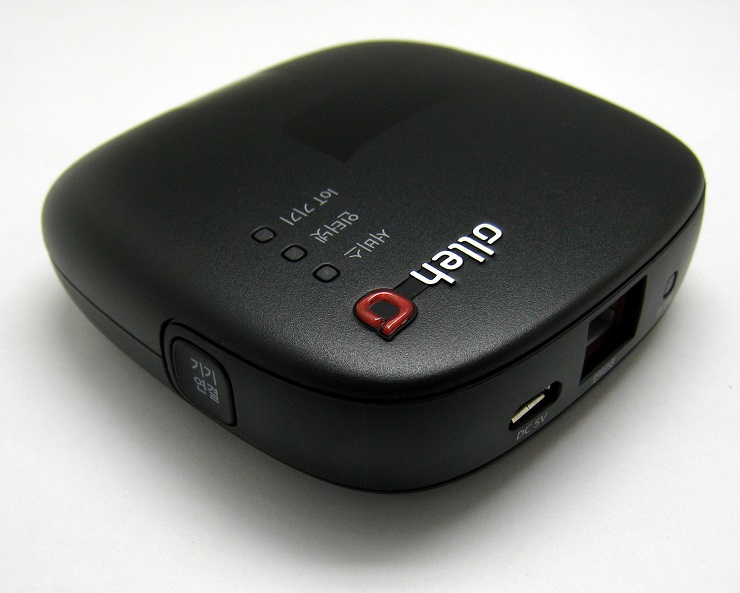
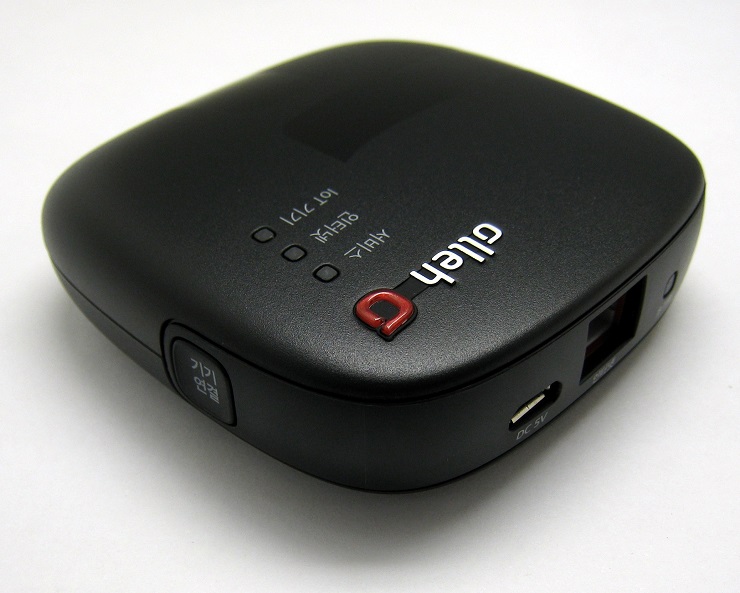
Name | IoT hub |
|---|
Short Description | IoT home-manager hub is universal controller which can control the several control group devices. |
|---|
Long Description | IoT home-manager hub is universal controller which can control the several control group devices. |
|---|
Brand | Mercury |
|---|
Product Identifier | MC01-507L |
|---|
OEM Version | HW: 1 FW: 1.01 |
|---|
Hardware Platform | ZM5202 |
|---|
Z-Wave Version | 6.51.06 |
|---|
Library Type | CONTROLLER_BRIDGE |
|---|
Device Type | Central Controller |
|---|
Role Type | ROLE_TYPE_CONTROLLER_CENTRAL_STATIC |
|---|
Manufacturer ID | 0x022D |
|---|
Product Type ID | 0x0100 |
|---|
Product ID | 0x0001 |
|---|
User Icon | 0x0100 |
|---|
Installer Icon | 0x0100 |
|---|
Frequency Plans | KR: 920.90MHz, 921.70MHz, 923.10MHz |
|---|
Categories | All Controllers, Gateway Controller |
|---|
Countries / Regions | Republic of Korea |
|---|
Controlled Command Classes | Identifier | Name | Key | Version |
|---|
COMMAND_CLASS_ASSOCIATION_GROUP_INFORMATION | Association Group Information V1 | 0x59 | 0 | COMMAND_CLASS_NO_OPERATION | No Operation | 0x00 | 1 | COMMAND_CLASS_USER_CODE | User Code | 0x63 | 1 | COMMAND_CLASS_DOOR_LOCK_V2 | Door Lock V2 | 0x62 | 2 | COMMAND_CLASS_MULTI_CHANNEL_ASSOCIATION_V3 | Multi-Channel Association V3 | 0x8E | 3 | COMMAND_CLASS_BATTERY | Battery | 0x80 | 1 | COMMAND_CLASS_SWITCH_BINARY | Switch Binary | 0x25 | 1 | COMMAND_CLASS_BASIC | Basic | 0x20 | 1 | COMMAND_CLASS_CRC_16_ENCAP | CRC16 Encapsulation | 0x56 | 1 | COMMAND_CLASS_SECURITY | Security S0 | 0x98 | 1 | COMMAND_CLASS_VERSION_V2 | Version V2 | 0x86 | 2 | COMMAND_CLASS_WAKE_UP_V2 | Wake Up V2 | 0x84 | 2 | COMMAND_CLASS_ZWAVEPLUS_INFO_V2 | Z-Wave Plus Info V2 | 0x5E | 2 | COMMAND_CLASS_ASSOCIATION_V2 | Association V2 | 0x85 | 2 | COMMAND_CLASS_METER_V3 | Meter V3 | 0x32 | 3 | COMMAND_CLASS_MULTI_CHANNEL_V4 | Multi-Channel V4 | 0x60 | 4 | COMMAND_CLASS_CONFIGURATION_V2 | Configuration V2 | 0x70 | 2 | COMMAND_CLASS_MANUFACTURER_SPECIFIC_V2 | Manufacturer Specific V2 | 0x72 | 2 | COMMAND_CLASS_NOTIFICATION_V4 | Notification V4 | 0x71 | 4 |
|
|---|
Documents | Category | Description | File |
|---|
Manual_Primary_Lang | Product or Owner's Manual | |
|
|---|
Association Groups | Group Number | Maximum Nodes Supported | End Point ID | Description |
|---|
1 | 5 | 0 | Z-Wave Plus Lifeline |
|
|---|
Texts | ID | Description | Value |
|---|
23 | Controller Inclusion | You can add the device ether hardware button or application.
- Hard ware button : Press the Add/Remove button(Start Z-Wave LED blink)
- Application :
1. Click Add the device button.
2. Click Start button. (Start blink Z-Wave LED)
3. MC01-507L put into inclusion mode and it is added the device. when finish the add device, the Z-Wave LED was green light ON.(Stop blink Z-Wave LED)
4. The home screen of the app shown the added device.
5. Click the device icon. the screen detail view about information of added-device and can control device on this screen. | 24 | Controller Exclusion | You can remove the device ether hardware button or application.
- hard ware button : Press the Add/Remove button(Start Z-Wave LED blink)
- Application :
1. Click Menu button on the screen detail view.
2. Click Remove the device button.
3. Click Remove button. (Start blink Z-Wave LED)
4. MC01-507L put into exclusion mode and it is removed the device. when finish the remove device, the Z-Wave LED was green light OFF. (Stop blink Z-Wave LED)
5. The home screen of the app shown the removed device. | 5 | Factory Reset | Press Reset button more than 5 seconds. | 3 | Learn Mode (adding another controller) | 1. Select Controller Learn Mode Request command in the Emulator.
2. Click Kafka Send button.
3. Enter the parameter value.
4. Click Confirm button. |
|
|---|
Supports NWI | Yes |
|---|
Supports Explorer Frames | Yes |
|---|
Radio Range Z-Wave (m) | 40 |
|---|