Product Recognition | |
|---|
Certification Number | ZC14-22120178 |
|---|
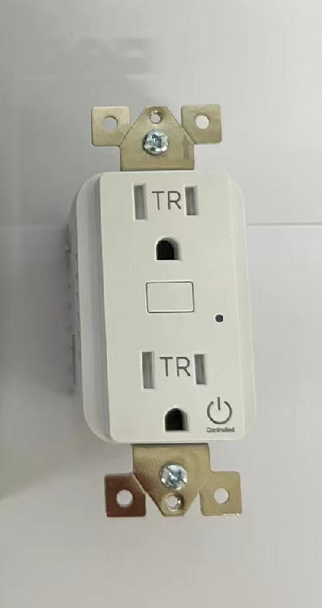
Name | JascoPro Z-Wave Plus In-Wall Tamper Resistant Smart Outlet,700S |
|---|
Short Description | Experience the latest generation of Z-Wave™ smart controls for in-wall smart outlet to accommodate any home. |
|---|
Long Description | Transform any home into a smart home with the JascoPro® Z-Wave™ In-Wall Smart Outlet. The Z-Wave™ Smart Outlet enables wireless control of on/off functions from the Z-Wave™ controlled outlet, and is compatible with incandescent, LED, Xenon, Halogen, fluorescent and compact fluorescent bulbs. The duplex receptacle includes a blue LED indicator light to easily locate the receptacle in a dark room. The receptacle replaces your current electrical outlet, uses your existing wiring and provides a Z-Wave™ enabled outlet for the lamp or appliance that you would like to control and a standard pass-through AC outlet for other electrical appliances. The receptacle requires in-wall installation with hardwired connections. Take control of your home lighting with JascoPro® Z-Wave™ Smart Lighting Controls! |
|---|
Brand | JascoPro |
|---|
Product Identifier | 59387/ZWA1003 |
|---|
Product Line | Wireless Lighting Controls |
|---|
OEM Version | HW: 01 FW: 01.07 |
|---|
Hardware Platform | ZGM130S037HGN2 / ZGM130S037HGN1 |
|---|
Z-Wave Version | 7.18.1 |
|---|
Library Type | END_NODE_ENHANCED_232 |
|---|
Device Type | Binary Switch DT |
|---|
Role Type | ROLE_TYPE_SLAVE_ALWAYS_ON |
|---|
Manufacturer ID | 0x0063 |
|---|
Product Type ID | 0x4952 |
|---|
Product ID | 0x3434 |
|---|
User Icon | 0x0700 |
|---|
Installer Icon | 0x0704 |
|---|
Frequency Plans | US: 916.00MHz, 908.40MHz |
|---|
Categories | On/Off Switches/Devices |
|---|
Countries / Regions | Canada, Mexico, United States of America |
|---|
Supported Command Classes | Identifier | Name | Key | Version |
|---|
COMMAND_CLASS_BASIC_V2 | Basic V2 | 0x20 | 2 | COMMAND_CLASS_SWITCH_BINARY_V2 | Binary Switch V2 | 0x25 | 2 | COMMAND_CLASS_CENTRAL_SCENE_V3 | Central Scene V3 | 0x5B | 3 | COMMAND_CLASS_CONFIGURATION_V4 | Configuration V4 | 0x70 | 4 | COMMAND_CLASS_SCENE_ACTIVATION | Scene Activation | 0x2B | 1 | COMMAND_CLASS_SCENE_ACTUATOR_CONF | Scene Actuator Configuration | 0x2C | 1 | COMMAND_CLASS_APPLICATION_STATUS | Application Status | 0x22 | 1 | COMMAND_CLASS_ASSOCIATION_V2 | Association V2 | 0x85 | 2 | COMMAND_CLASS_ASSOCIATION_GRP_INFO_V3 | Association Group Information (AGI) V3 | 0x59 | 3 | COMMAND_CLASS_DEVICE_RESET_LOCALLY | Device Reset Locally | 0x5A | 1 | COMMAND_CLASS_FIRMWARE_UPDATE_MD_V5 | Firmware Update Meta Data V5 | 0x7A | 5 | COMMAND_CLASS_INDICATOR_V3 | Indicator V3 | 0x87 | 3 | COMMAND_CLASS_MANUFACTURER_SPECIFIC_V2 | Manufacturer Specific V2 | 0x72 | 2 | COMMAND_CLASS_MULTI_CHANNEL_ASSOCIATION_V3 | Multi Channel Association V3 | 0x8E | 3 | COMMAND_CLASS_VERSION_V3 | Version V3 | 0x86 | 3 | COMMAND_CLASS_ZWAVEPLUS_INFO_V2 | Z-Wave Plus Info V2 | 0x5E | 2 | COMMAND_CLASS_SECURITY_2 | Security 2 | 0x9F | 1 | COMMAND_CLASS_SUPERVISION | Supervision | 0x6C | 1 | COMMAND_CLASS_TRANSPORT_SERVICE_V2 | Transport Service V2 | 0x55 | 2 | COMMAND_CLASS_POWERLEVEL | Powerlevel | 0x73 | 1 |
|
|---|
S2 Classes | S2_AUTHENTICATED, S2_UNAUTHENTICATED |
|---|
Documents | Category | File |
|---|
Manual_English | |
|
|---|
Features | Feature | Values |
|---|
Firmware Updatable | Value |
|---|
Updatable by Consumer by RF |
| Neutral Wire Required | | Switch Type | Value |
|---|
Push Button with Indicator |
| Switch Load Capacity Current | | Switch Load Capacity Watts | |
|
|---|
Association Groups | Group Number | Maximum Nodes Supported | End Point ID | Group Name | Profile |
|---|
1 | 5 | 0 | Lifeline | 0x0001 | 2 | 5 | 0 | Single Press | 0x2001 |
|
|---|
Configuration Parameters | Parameter Number | Name | Description | Format | Size | Min Value | Max Value | Default Value |
|---|
3 | LED Light Mode | Set the LED Light Mode | 1 | 1 | 0 | 0 | 0x01 | 84 | Reset Factory Default | Reset Switch to Factory Defaults | 1 | 1 | 0 | 0 | 0x00 |
|
|---|
Texts | ID | Description | Value |
|---|
8 | Where to find S2 DSK on product | Page 1 , Left : Adding your device to Zwave network | 1 | Classic Inclusion | 1. Follow the instructions for your Z-Wave certified controller to add a device to
the Z-Wave network.
2. Once the controller is ready to add your device, press the program button. | 2 | Classic Exclusion | 1.Follow the instructions for your Z-Wave certified controller to remove a device
from the Z-Wave network.
2. Once the controller is ready to remove your device, press the program button. | 5 | Factory Reset Procedure | Press the program button three times, then, press and hold the button for at
least three seconds. The LED blinks five times to confirm. |
|
|---|
Supports NWI | Yes |
|---|
Supports Explorer Frames | Yes |
|---|
Supports SmartStart | Yes |
|---|
Radio Range Z-Wave (m) | 40 |
|---|