Product Recognition | |
|---|
Certification Number | ZC10-17015385 |
|---|
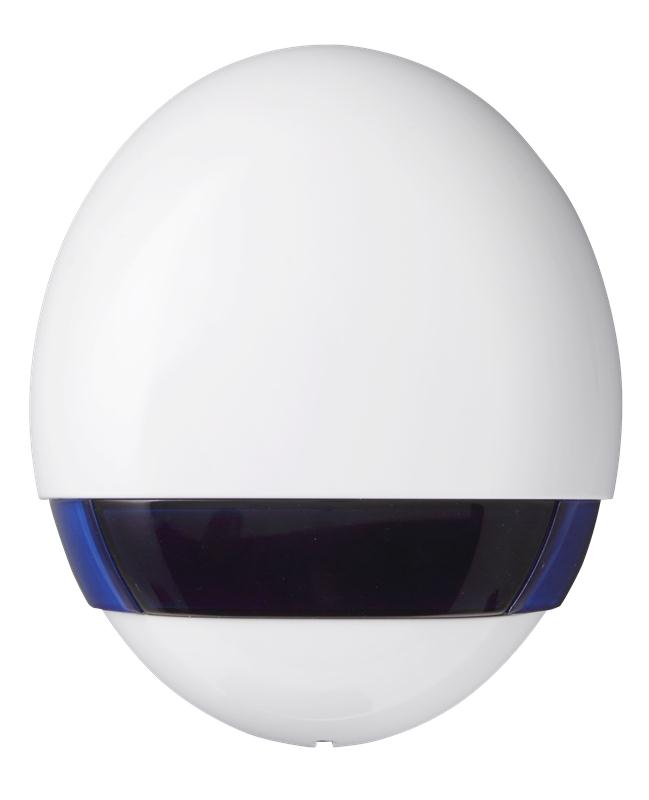
Name | Outdoor Siren |
|---|
Short Description | BX-32ZW is a battery-operated wireless outdoor siren generating a loud 107 decible siren sound and strobe lights to provide visible and audible alerts for possible intruders, emergencies, and safety incidents. |
|---|
Long Description | BX-32ZW is a battery-operated wireless outdoor siren generating a loud 107 decible siren sound and strobe lights to provide visible and audible alerts for possible intruders, emergencies, and safety incidents.
The multi-functional outdoor bell box can work with the Control Panel to emit entry, exit delay, and low battery beeps. The BX-32ZW generates unique alarm sounds for fire and burglary to inform users of the type of danger at hand. It’s tamper-deterrent feature protects against unauthorized removal and sabotage. The BX-32ZW is compatible with other manufacturers’ Z-Wave alarm systems. |
|---|
Brand | Climax Technology |
|---|
Product Identifier | BX-32ZW |
|---|
OEM Version | HW: 255 FW: 1.04 |
|---|
Hardware Platform | ZM5101 |
|---|
Z-Wave Version | 6.61.00 |
|---|
Library Type | SLAVE_ENHANCED_232 |
|---|
Device Type | Siren |
|---|
Role Type | ROLE_TYPE_SLAVE_SLEEPING_LISTENING |
|---|
Manufacturer ID | 0x018E |
|---|
Product Type ID | 0x0002 |
|---|
Product ID | 0x000B |
|---|
User Icon | 0x0F00 |
|---|
Installer Icon | 0x0F00 |
|---|
Frequency Plans | EU: 869.85MHz, 868.40MHz |
|---|
Categories | Security Add-Ons |
|---|
Countries / Regions | European Union |
|---|
Supported Command Classes | Identifier | Name | Key | Version |
|---|
COMMAND_CLASS_POWERLEVEL | Powerlevel | 0x73 | 1 | COMMAND_CLASS_BATTERY | Battery | 0x80 | 1 | COMMAND_CLASS_SWITCH_BINARY | Switch Binary | 0x25 | 1 | COMMAND_CLASS_BASIC | Basic | 0x20 | 1 | COMMAND_CLASS_CONFIGURATION | Configuration | 0x70 | 1 | COMMAND_CLASS_SECURITY | Security S0 | 0x98 | 1 | COMMAND_CLASS_VERSION_V2 | Version V2 | 0x86 | 2 | COMMAND_CLASS_DEVICE_RESET_LOCALLY | Device Reset Locally | 0x5A | 1 | COMMAND_CLASS_ZWAVEPLUS_INFO_V2 | Z-Wave Plus Info V2 | 0x5E | 2 | COMMAND_CLASS_ASSOCIATION_V2 | Association V2 | 0x85 | 2 | COMMAND_CLASS_ASSOCIATION_GRP_INFO | Association Group Info | 0x59 | 1 | COMMAND_CLASS_SCENE_ACTIVATION | Scene Activation | 0x2B | 1 | COMMAND_CLASS_FIRMWARE_UPDATE_MD_V2 | Firmware Update Meta-Data V2 | 0x7A | 2 | COMMAND_CLASS_MANUFACTURER_SPECIFIC_V2 | Manufacturer Specific V2 | 0x72 | 2 | COMMAND_CLASS_NOTIFICATION_V4 | Notification V4 | 0x71 | 4 |
|
|---|
Documents | Category | Description | File |
|---|
Manual_Primary_Lang | Product or Owner's Manual | |
|
|---|
Features | Feature | Values |
|---|
Battery Quantity | | Battery Type | Value |
|---|
1.5V D-Cell Alkaline |
| Outdoor Use | | Firmware Updatable | Value |
|---|
Updatable by Professional/Technician |
| IP (Ingress Protection) Rated | |
|
|---|
Association Groups | Group Number | Maximum Nodes Supported | End Point ID | Description |
|---|
1 | 1 | 0 | Group 1 for “LifeLine” (maximum node:1):
Battery CC (COMMAND_CLASS_BATTERY)
Notification CC,V4 (COMMAND_CLASS_NOTIFICATION)
SwitchBinary CC, V1 (COMMAND_CLASS_SWITCH_BINARY)
Device Reset Locally CC
| 2 | 5 | 0 | Group 2 for “Tamp rep” (maximum node: 5):
Notification CC,V4 (COMMAND_CLASS_NOTIFICATION)
When Tamper Open, Group 2 send Notification
(Type:07,Event:03), Tamper Close send Notification
(Type:07,Event:00,Parameter:03)
| 3 | 5 | 0 | Group 3 for “AC rep” (maximum node: 5):
Notification CC,V4 (COMMAND_CLASS_NOTIFICATION)
When AC Fail send Notification (Type:08,Event:02),
When AC Restore send Notification (Type:08, Event:03)
|
|
|---|
Texts | ID | Description | Value |
|---|
2 | Exclusion | The Bellbox must be removed from existing Z-Wave network before being included into another. There are two methods available to exclude a device.
Exclusion Mode
- Put the Z-Wave gateway or control panel into Exclusion mode
(please refer to the Z-Wave gateway or control panel manual).
- Within 1.5 seconds, press the Function Button 3 times and the
Bellbox will be removed from the Z-Wave network. | 1 | Inclusion | This product can be included and operated in any Z-Wave network with other Z-Wave certified devices from other manufactures and/or other applications. All non-battery operated nodes within the network will act as repeaters regardless of vendor to increase reliability of the network.
- Insert the two 1.5V D-Cell alkaline batteries into the battery
compartment connecting the correct polarity as shown on the
battery compartment lid.
- The Bellbox will emit a 2-tone beep.
Put the Z-Wave gateway or control panel into Inclusion mode (please
refer to the Z-Wave gateway or control panel manual).
- Within 1.5 seconds, press the Function Button 3 times.
- Refer to the operation manual of the Z-Wave Gateway or Control
Panel to complete the adding process.
- If the sensor has already been added (included) into another Z-Wave
Gateway/Control Panel, or if the sensor is unable to be added into
the current Z-Wave Gateway/Control Panel, please exclude it first
(see Removing Device) before attempting to include it into the
current Z-Wave Gateway/Control Panel. | 5 | Factory Reset | Factory Reset
(Only use factory reset when network Control Panel/Gateway is missing or inoperable).
- Press and hold the Function button of the Bellbox for 10 seconds to
factory reset with all LED flashes once.
Factory resetting the Bellbox will restore it to factory default
settings (excluded from the Z-Wave network). The Z-Wave gateway
or control panel will still keep its Z-Wave settings. Please refer to
the gateway or control panel manual on how to remove the
Bellbox’s Z-Wave settings. |
|
|---|
Supports NWI | Yes |
|---|
Supports Explorer Frames | Yes |
|---|
Is Flirs | Yes |
|---|
Radio Range Z-Wave (m) | 40 |
|---|