
| Product Recognition | |
|---|
| Certification Number | ZC10-16065104 |
|---|
| Name | Z-Uno |
|---|
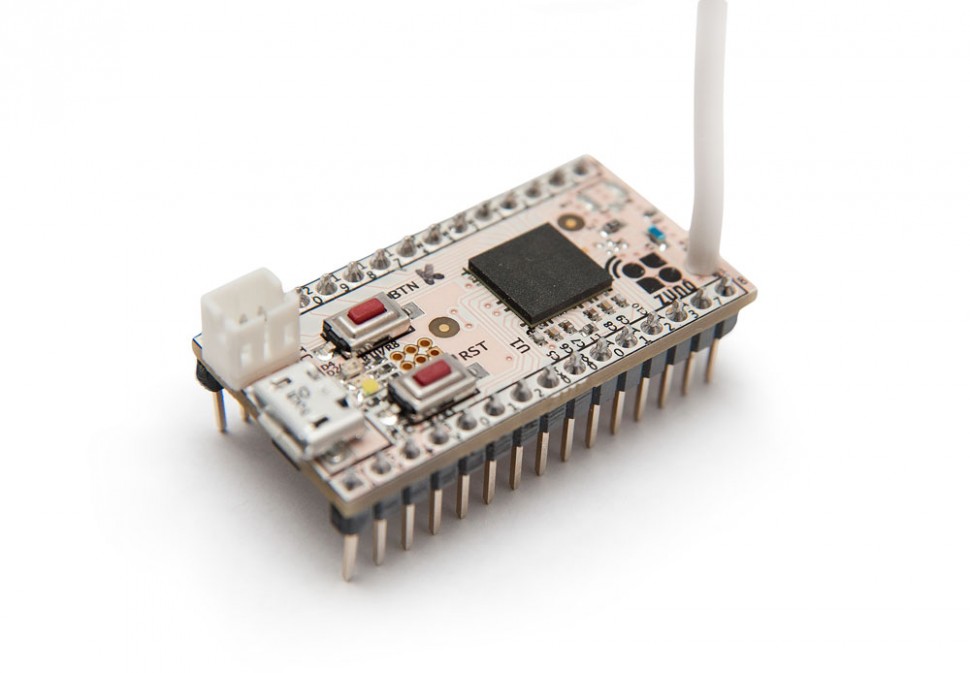
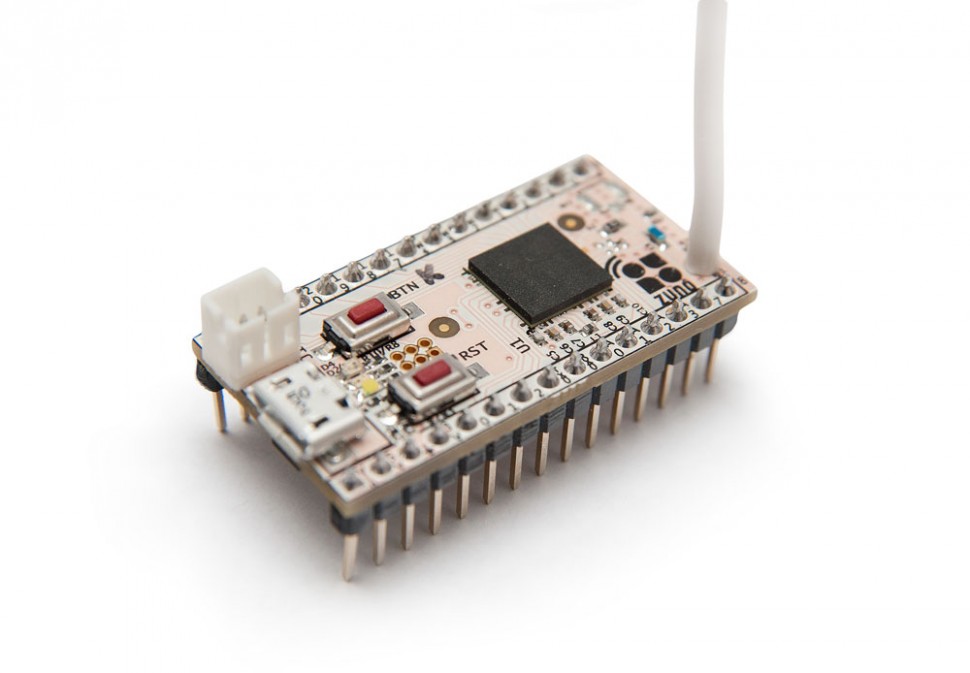
| Short Description | Z-Uno is a developer board that allows you to create your own Z-Wave device without deep knowledge of Z-Wave protocol using Arduino IDE. Certified 10 Channels sketch. |
|---|
| Long Description | Z-Uno is the first and only easy to use developer board that allows you to create your own Z-Wave device without deep knowledge of Z-Wave protocol or programming. Z-Uno is a mix of Z-Wave home automation radio protocol power and Arduino simplicity. Being inspired by Arduino project Z-Uno inherits all concepts of easy-to-use hardware and software solutions, keeping maximum flexibility.
Z-Uno is a fully DIY product. It is made for those who are limited by existing choice of Z-Wave products and wants to extend their smart homes with more sensors and actuators: connect LEDs, buttons, switches, motors or any low voltage sensor including most of Arduino compatible sensors.
Z-Uno programming is done by writing sketch in simplified C language and loaded into Z-Uno using Arduino IDE. Many examples and comprehensive tutorials will help you to make your own project.
This is one of the two officially certified sketches.
Certified 10 Channels sketch
http://z-uno.z-wave.me/examples/Certified10Channels/ |
|---|
| Brand | Z-Wave.Me |
|---|
| Product Identifier | v3 |
|---|
| OEM Version | HW: 1 FW: 0.70 |
|---|
| Hardware Platform | WML-C85 |
|---|
| Z-Wave Version | 6.51.06 |
|---|
| Library Type | SLAVE_ENHANCED_232 |
|---|
| Device Type | On/Off Power Switch |
|---|
| Role Type | ROLE_TYPE_SLAVE_ALWAYS_ON |
|---|
| Manufacturer ID | 0x0115 |
|---|
| Product Type ID | 0x0110 |
|---|
| Product ID | 0x0001 |
|---|
| User Icon | 0x0700 |
|---|
| Installer Icon | 0x0700 |
|---|
| Frequency Plans | EU: 869.85MHz, 868.40MHz |
|---|
| Categories | Hospitality, Sensors, All Lighting Devices, Dimming Lighting Devices, On/Off Switches/Devices, Lighting Accessories |
|---|
| Countries / Regions | European Union |
|---|
| Controlled Command Classes | | Identifier | Name | Key | Version |
|---|
| COMMAND_CLASS_SWITCH_MULTILEVEL | Switch Multilevel | 0x26 | 1 | | COMMAND_CLASS_BASIC | Basic | 0x20 | 1 | | COMMAND_CLASS_SECURITY | Security S0 | 0x98 | 1 | | COMMAND_CLASS_MULTI_CHANNEL_V4 | Multi-Channel V4 | 0x60 | 4 |
|
|---|
| Documents | |
|---|
| Features | | Feature | Values |
|---|
| Communications Connections | | Value |
|---|
| USB (Universal Serial Bus) |
| | Firmware Updatable | | Value |
|---|
| Updatable by Consumer by Wire |
| | Sensors | | Value |
|---|
| Motion/No Motion (Binary) | | Air Temperature | | Luminance | | Moisture | | Humidity | | Open/Closed (Binary) | | Smoke Density | | Heat | | Freeze | | Vibration/Shock (Binary) | | Water Flow | | Carbon Dioxide | | Carbon Monoxide |
|
|
|---|
| Association Groups | | Group Number | Maximum Nodes Supported | End Point ID | Description |
|---|
| 3 | 5 | 0 | Configurable group to send on/off, dimming or scene activation. See product reference | | 4 | 5 | 0 | Configurable group to send on/off, dimming or scene activation. See product reference | | 1 | 5 | 0 | Z-Wave Plus Lifeline. All unsolicited reports on all channels are sent to this group | | 2 | 5 | 0 | Configurable group to send on/off, dimming or scene activation. See product reference | | 5 | 5 | 0 | Configurable group to send on/off, dimming or scene activation. See product reference | | 6 | 5 | 0 | Configurable group to send on/off, dimming or scene activation. See product reference |
|
|---|
| Configuration Parameters | | Parameter Number | Name | Format | Size | Min Value | Max Value | Default Value | Parameter Values |
|---|
| 2 | Blink with service LED during operation | 0 | 1 | 0 | 0 | 0 | | From | To | Description |
|---|
| 0 | 0 | Dont blink | | 1 | 1 | Blink |
|
|
|---|
| Texts | | ID | Description | Value |
|---|
| 1 | Inclusion | Press Service button three times | | 2 | Exclusion | Press Service button three times | | 5 | Factory Reset | Hold Service button for five seconds, then press Service button three times.
Use this procedure only if your controller is missing or inoperable.
Note that the user sketch is not erased during exclusion or reset process. | | 4 | Device Wake-Up | Press Service button three times |
|
|---|
| Supported Multilevel Sensors | | Multilevel Sensor Type |
|---|
| Air temperature | | 0x02 | | Illuminance | | Humidity | | Carbon dioxide CO2-level | | Moisture | | Carbon monoxide (CO) level | | Smoke density | | Water flow |
|
|---|
| Supports NWI | Yes |
|---|
| Supports Explorer Frames | Yes |
|---|